DOMPurify ≤3.2.6 bypass via SMIL animateTransform on Safari
- 📜 Introduction
- 🎞️ SVG animation with SMIL
- ⚙️ DOMPurify default SMIL configuration
- 🌐 Browsers' animateTransform tag implementations
- 🍎 (Safari) DOMPurify ≤3.2.6 bypass
- 💭 Reflections
- 📚 Bibliography
It's been more than a year now since the two-article Exploring the DOMPurify library series was released. Since then, browsers have improved their security a lot. The most recent mXSS game-changing update is the < and > escaping in attributes during serialization, which breaks mXSS techniques that rely on two parsing steps, like the ones we used for years to bypass DOMPurify:
| Browser | Fixed in | Release date | Source |
|---|---|---|---|
| Chromium | 138 | June 24, 2025 | Chrome for Developers advisory |
| Firefox | 140 | June 24, 2025 | Firefox 140 release notes |
| Safari | 26 | September 15, 2025 | WebKit features in Safari 26.0 |
Since this update, almost every DOMPurify bypass has stopped working. The only one still standing is @SecurityMB's 2.0.17 bypass. At the same time, Cure53 has been hardening DOMPurify a lot! Probably thanks to AI, but you can trust me, DOMPurify has never been as hard to bypass as it is today.
At the same time, a lot of incredible HTML features have been released recently. One of them even enabled a novel way to perform mutation, found by @Kabir4charya using the <selectedcontent> tag (official advisory).
In that context, with the goal of finding a new way to achieve XSS in a hardened sanitizer context, I started to look at DOMPurify again. This time, not to find a latest default configuration bypass, but first to have a 3.X.X bypass working again on at least one browser. Importantly, I've been doing it mostly manually, and using AI only for very specific browser source-code research to help me go faster on very specific ideas I could have in mind. It's more fun this way, isn't it? :D
This being said, let's dive into what I found!
Everything started while looking at DOMPurify commits again, when I came across this one:


Fig. 1: DOMPurify commit fixing the animated href attributes check.
It fixes a configuration-specific bypass that uses Synchronized Multimedia Integration Language (SMIL). To understand how it works, there is no better resource than MDN.
In short, it allows us to perform animations within the SVG namespace. At that point, you might think:
How could an animation trigger XSS and, even more, bypass DOMPurify?
This is a fair point! Indeed, this is how it can be used in SVG:
Fig. 2: SVG attribute animation with SMIL.
The most important point here is the <animate> tag. The way it must be read is: animate the <circle> (parent tag) by updating its cx coordinate from 0 to 500 in 5s.
The way it works is that, behind the scenes, it uses attr.baseVal to store the non-animated attribute value, while it updates attr.animVal for the animation. From the above example, these would be the values:
circle.cx.baseVal.value; // 0
circle.cx.animVal.value; // between 0 and 500 depending on the timing
Fig. 8: baseVal vs animVal values during SMIL animation.
This is especially interesting as it not only allows us to animate colors, opacity, dimensions, etc., but also <a href>! This is not new and has already been highlighted in the past (short list):
| Author | Resource |
|---|---|
| GreyMagic Software | Remotely Exploitable XSS in Hotmail and Yahoo |
| Mario Heiderich, Tilman Frosch, Meiko Jensen, Thorsten Holz | Crouching Tiger – Hidden Payload: Security Risks of SVG |
| Mario Heiderich, Christopher Späth, Jörg Schwenk | DOMPurify: Client-Side Protection Against XSS and Markup Injection |
| @garethheyes | SVG Animate XSS Vector |
| @hash_kitten | Two Bypasses for Chrome's Sanitizer API |
For example:
Fig. 3: SMIL-based href animation leading to javascript: execution.
⚙️ DOMPurify default SMIL configuration
The <animate> tag isn't the only SMIL tag. Here is the full list:
- <animate>: Animates almost any animatable SVG attribute or CSS property.
- <set>: Assigns a value for a period of time without interpolation.
- <animateTransform>: Animates transformations such as translation, rotation, scaling, or skewing.
- <animateMotion>: Moves an element along a path.
- <animateColor> (removed from SVG 2): Was used to animate color values over time.
In terms of exploitation, <animate> and <set> work similarly, <animateTransform> applies transformations, and <animateMotion> moves an element along a path.
With that in mind, if we look at the DOMPurify ≤3.2.6 sources, something stands out:
export const svg = freeze([
  // [...]
  'animatecolor',
  'animatemotion',
  'animatetransform',
  // [...]
] as const);
Fig. 9: Default allowed SVG tags (source).
export const svgDisallowed = freeze([
  'animate',
  // [...]
  'set',
  // [...]
] as const);
Fig. 10: Disallowed SVG tags (source).
export const svg = freeze([
  // [...]
  'attributename',
  'attributetype',
  // [...]
  'values',
  // [...]
] as const);
Fig. 11: Default allowed SVG attributes (source).
The <animate> and <set> tags aren't part of the default configuration, while <animatetransform>, <animatemotion>, and <animatecolor> are. Similarly, the attributename, attributetype, and values SMIL attributes are allowed by default!
While the from and to attributes aren't allowed by default, values can be used instead, as it accepts a semicolon-separated list of animation values. With two entries, it can represent <from>;<to>.
🌐 Browsers' animateTransform tag implementations
From that point, I started asking myself:
Could there be a way to set the .animVal of <a href> from another SMIL tag besides <animate> and <set>?
Among the three available SMIL tags, <animateTransform> is the most interesting target to go for, as it uses the attributeName attribute as well. It's just limited. Looking into the browsers' implementations of this tag, we can find:
| Browser | attributeName check |
|---|---|
| Chromium | Requires the target property to be a kAnimatedTransformList. |
| Firefox | Each SVG target class defines or inherits its valid transform attribute name (transform, gradientTransform, or patternTransform). Firefox requires attributeName to match that name. |
| Safari | Only checks that the target attribute is animatable, it does not require a transform attribute. |
From that short summary, we can already see where this is going. On Safari, the attributeName can target any attribute WebKit considers animatable, making <a href> a valid target! However, knowing this won't be enough to trigger XSS, as in the case of <animateTransform> we don't control the exact .animVal that is going to be set. The supplied value is first converted into a serialized transform-function string, such as translate(10 20), before being passed to the target attribute's animator.
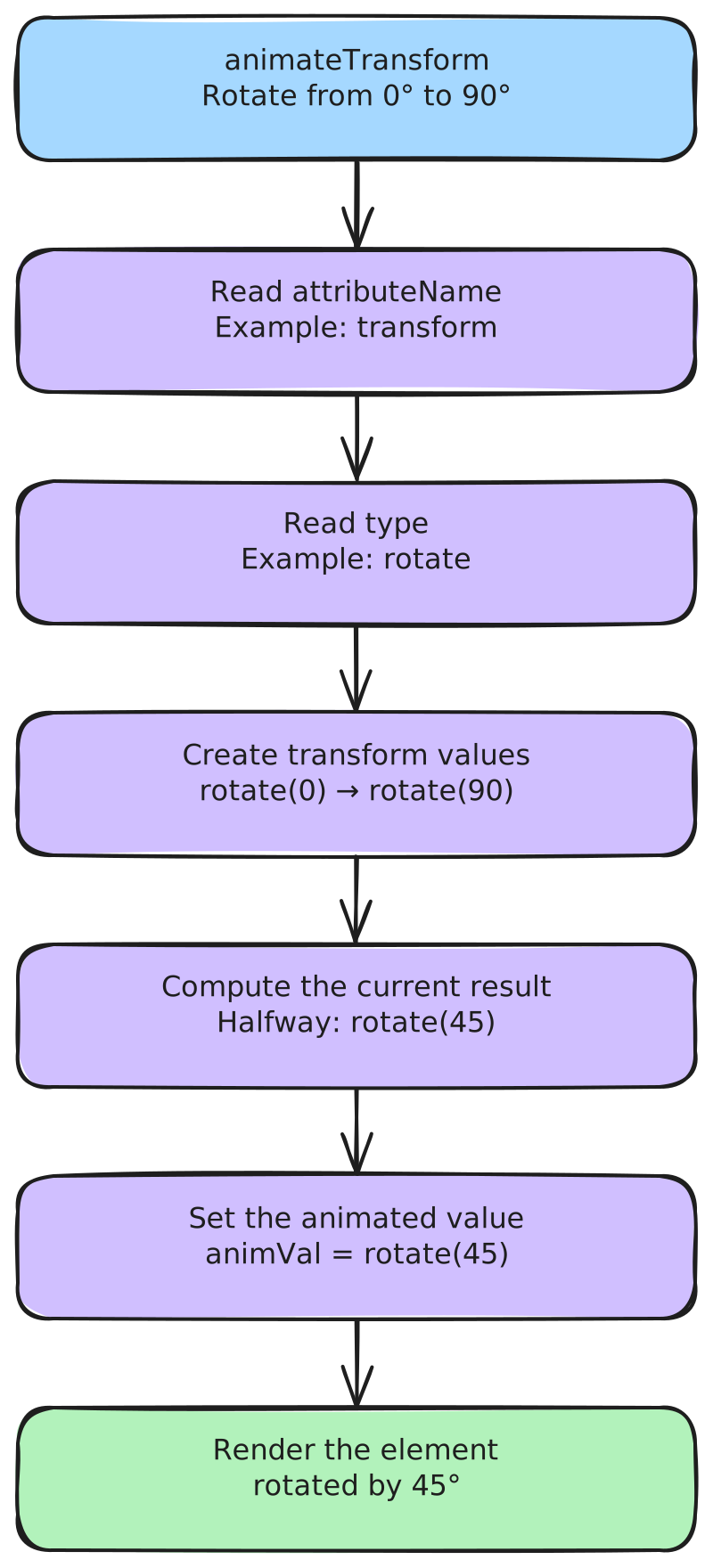
Fig. 4: animateTransform value processing flow.
So, as we can see, the final animVal depends on the type attribute. On Safari, this is how the "transform-function string" is computed:
static ASCIILiteral prefixForTransformType(SVGTransformType type)
{
    switch (type) {
    case SVG_TRANSFORM_UNKNOWN:
        return ""_s;
    case SVG_TRANSFORM_MATRIX:
        return "matrix("_s;
    case SVG_TRANSFORM_TRANSLATE:
        return "translate("_s;
    case SVG_TRANSFORM_SCALE:
        return "scale("_s;
    case SVG_TRANSFORM_ROTATE:
        return "rotate("_s;
    case SVG_TRANSFORM_SKEWX:
        return "skewX("_s;
    case SVG_TRANSFORM_SKEWY:
        return "skewY("_s;
    }
    ASSERT_NOT_REACHED();
    return ""_s;
}
Fig. 12: WebKit's prefixForTransformType implementation (source).
String SVGAnimateTransformElement::animateRangeString(const String& string) const
{
    return makeString(SVGTransformValue::prefixForTransformType(m_type), string, ')');
}
Fig. 13: WebKit's animateRangeString appending ) to the value (source).
Interestingly, the value is prepended by the transform function in every case except SVG_TRANSFORM_UNKNOWN! This case occurs when the type value doesn't match any known transform function: type=x reaches it. Then, no matter the type value, it appends ) at the end to close the transform function, even if there is none.
🍎 (Safari) DOMPurify ≤3.2.6 bypass
Last but not least, an important point about the SMIL implementation is the way the values attribute works. As we said, its value can be <from>;<to>, and this is super interesting in the DOMPurify context. Indeed, DOMPurify checks the complete value of attributes such as values against IS_ALLOWED_URI when they aren't part of URI_SAFE_ATTRIBUTES. Because of that, values="javascript:alert(1)//;javascript:alert(2)//" would be removed, while values="XXX;javascript:alert(2)" won't!
Bringing everything together, we get a DOMPurify ≤3.2.6 bypass on Safari :D
Fig. 5: DOMPurify ≤3.2.6 bypass on Safari using animateTransform.
It's still important to highlight two limitations:
- User interaction is required.
- The Content-Security-Policy must allow javascript: URL execution.
Therefore, in comparison to the previous 3.1.X bypasses found 2 years ago, this one does not require complex mutation or frequently blocked tags like <form> or <style>, and it works with server-side sanitization (no node flattening/DOM clobbering) 🔥
In case you want to take a fresh look at where I failed, this specific technique is blocked in the latest DOMPurify version by the animated href check introduced by @llamakko. Maybe I missed something that could make the payload work against the latest version!
Finding DOMPurify bypasses has never been as hard as it is nowadays. Therefore, I strongly believe there is still a lot to be found in the HTML parsing area. Each time I play with HTML parsing, I learn new fun behavior I wasn't aware of. For example, did you know that the HTML tokenizer accepts attributes on closing tags, even though the tree builder ignores them? :D
SVG Namespace:
Fig. 6: Closing tag attribute parsing in SVG namespace.
HTML Namespace:
Fig. 7: Closing tag attribute parsing in HTML namespace.
Even if it might be almost impossible to bypass DOMPurify today, complex browser updates still remind us that nothing is impossible. I think @Kabir4charya's <selectedcontent> is a great example of that. So, don't hesitate, and try to find new HTML quirks yourself :D
Without speaking about the latest DOMPurify bypasses, it would be amazing to see a new payload that bypasses DOMPurify ≤3.X.X on all three: Chromium, Firefox, and Safari!
- cure53. DOMPurify. https://github.com/cure53/DOMPurify
- @kevin_mizu. Exploring the DOMPurify library: Bypasses and Fixes (1/2). https://mizu.re/post/exploring-the-dompurify-library-bypasses-and-fixes
- @SecurityMB. Mutation XSS via namespace confusion – DOMPurify < 2.0.17 bypass. https://www.securitum.com/mutation-xss-via-mathml-mutation-dompurify-2-0-17-bypass.html
- @Kabir4charya. DOMPurify selectedcontent bypass. https://github.com/cure53/DOMPurify/security/advisories/GHSA-87xg-pxx2-7hvx
- @llamakko. DOMPurify fix for animated href attributes. https://github.com/cure53/DOMPurify/commit/f1c9a6427bc0fb9ad02eed3b317ffb6415eecea7
- Mozilla. SVG animation with SMIL. https://developer.mozilla.org/en-US/docs/Web/SVG/Guides/SVG_animation_with_SMIL
- GreyMagic Software. Remotely Exploitable XSS in Hotmail and Yahoo. https://seclists.org/bugtraq/2004/Mar/219
- Mario Heiderich, Tilman Frosch, Meiko Jensen, Thorsten Holz. Crouching Tiger – Hidden Payload: Security Risks of SVG. https://doi.org/10.1145/2046707.2046735
- Mario Heiderich, Christopher Späth, Jörg Schwenk. DOMPurify: Client-Side Protection Against XSS and Markup Injection. https://doi.org/10.1007/978-3-319-66399-9_7
- Gareth Heyes. SVG Animate XSS Vector. https://portswigger.net/research/svg-animate-xss-vector
- Adam Kues. Two Bypasses for Chrome's Sanitizer API. https://www.slcyber.io/research/two-bypasses-for-chromes-sanitizer-api
- Chromium. SVGAnimateTransformElement implementation. https://github.com/chromium/chromium/blob/ee72b1aae979bd925f99dac59ed745a33569e93f/third_party/blink/renderer/core/svg/svg_animate_transform_element.cc
- Mozilla Firefox. SMILAnimationController. https://github.com/mozilla-firefox/firefox/blob/9a8a80db6ce10ffc2fc91a1e25685eed59ce3501/dom/smil/SMILAnimationController.cpp
- WebKit. SVGTransformValue.h. https://github.com/WebKit/WebKit/blob/c42e31f1f0791a14c01324c2056ab86d3f4144ec/Source/WebCore/svg/SVGTransformValue.h
- WebKit. SVGAnimateTransformElement.cpp. https://github.com/WebKit/WebKit/blob/c42e31f1f0791a14c01324c2056ab86d3f4144ec/Source/WebCore/svg/SVGAnimateTransformElement.cpp
- Chrome for Developers. Escaping attributes. https://developer.chrome.com/blog/escape-attributes
- Mozilla. Firefox 140 release notes. https://www.mozilla.org/en-US/firefox/140.0/releasenotes/
- WebKit. WebKit features in Safari 26.0. https://webkit.org/blog/17333/webkit-features-in-safari-26-0/